Hi everybody,
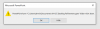
I'm facing an error with accessing files in a windows 10 VM, especially with Office 365:
My current system (in brackets: what changed to the previously environment where it was running):
I'm facing an error with accessing files in a windows 10 VM, especially with Office 365:
- When I want to open an existing Office-file (no matter if Powerpoint, Word, Excel) from my Mac, I get the error e.g. "Microsoft XYZ can't access the file 123." (maybe I translated it wrong - I'm using German language)
- When I create a new file and want to save it locally in the Win10-VM, Office crashes without error
- Besides, I noticed in another application (WISO Buchhaltung), that I can not change the paths in the settings anymore - it just offers me to select "root" and no other paths
- (Further then this: I can not pin icons to the taskbar anymore. As soon as I close the application, the Icon disapears again)
- Re-installed parallels
- Re-installed Win10 from iso-image and by selecting in the parallels-wizzard
- Re-installed office 365 as well as the other application
- Re-installed Parallels tools
- Changed the hardware-type from "NVME" to "SATA" in parallel's hardware-settings of the VM
- Tried to fix it according to: https://kb.parallels.com/en/115026
My current system (in brackets: what changed to the previously environment where it was running):
- MacBook Pro 13" early 2015
- Latest Version, fresh installed Catalina (before: updated from Mojave)
- SSD: Samsung 970 Evo M.2 1 TB (before: original Apple 512GB HDD)
- Parallels 15.1.1 (47117)
- Latest Version of Win10
- Latest Version of Office from Office 365-business-account