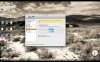
I recently upgraded to both Mountain Lion and PD8, where previously I had been using Lion and PD7. In my previous setup, when I went into full-screen mode, the Windows session would automatically adjust the screen resolution to go full screen. In the new setup, the "full" screen include two black bars at the top and bottom. The top area appears to be the same height as the Mac menu bar, and the bottom looks pretty much the same.
I have tried fiddling with the "Scale to Fit Screen" configuration setting, but nothing (save "Stretch", which is obviously unacceptable) fixes it.
Again, this is new with PD8/ML. Is there a workaround and/or fix coming?
Thanks, in advance,
Tom Otvos
I have tried fiddling with the "Scale to Fit Screen" configuration setting, but nothing (save "Stretch", which is obviously unacceptable) fixes it.
Again, this is new with PD8/ML. Is there a workaround and/or fix coming?
Thanks, in advance,
Tom Otvos