Hi,
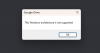
So I've installed Google Drive on my MAC OS and tried the "sharing cloud folders with Windows" option and I only see my iCloud folder.
I've tried to reinstall Parallels Tools and still it doesn't work.
When I try to select a specific folder from my Google Drive folder using the 'Managed Folder' option it does work, but if I loose connection to Google Drive - it gets disconnected and I need to reselect the folders again.
I'm using Parallels Version 18.1.1 (53328) and running Win11 Pro - 22H2 version 22621.1105
Hope you guys will be able to help me out, my workflow is very complex as a result of this issue.
So I've installed Google Drive on my MAC OS and tried the "sharing cloud folders with Windows" option and I only see my iCloud folder.
I've tried to reinstall Parallels Tools and still it doesn't work.
When I try to select a specific folder from my Google Drive folder using the 'Managed Folder' option it does work, but if I loose connection to Google Drive - it gets disconnected and I need to reselect the folders again.
I'm using Parallels Version 18.1.1 (53328) and running Win11 Pro - 22H2 version 22621.1105
Hope you guys will be able to help me out, my workflow is very complex as a result of this issue.