huge cpu load due to prl_vm_app

patimages

Member
Hi,

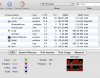
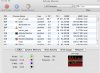
with the last 2 latest builts of parallels desktop 4, I am having huge troubles with very high cpu load caused by the prl_vm_app process (see attached). I am starting this thread as some others dealing with the same problem remain unanswered. Lets hope your team hear this... For info, I tried reinstalling from another account, no luck. I checked the drivers in xp, all is fine.

I reported this problem with ID 15253 but no answer... I really do hope to hear from you or will do like some of my colleagues : switch to wmware as I cannot work under this conditions : the laptop is literally burning up and the battery dying in a matter of minutes!!!

specs:
running leopard 10.5.5 and xp and built 3040.

Hardware Overview:

Model Name: MacBook Pro
Model Identifier: MacBookPro4,1
Processor Name: Intel Core 2 Duo
Processor Speed: 2.5 GHz
Number Of Processors: 1
Total Number Of Cores: 2
L2 Cache: 6 MB
Memory: 4 GB
Bus Speed: 800 MHz

Performance Counters View Utility v4.0.3540.209168
Copyright 2008 Parallels, Inc.

My Boot Camp - 23:03:45 +10 sec
devices.ide0.aligned_writes 0
devices.ide0.fsync 0
devices.ide0.new_blocks_created 0
devices.ide0.read_requests 0
devices.ide0.read_total 0
devices.ide0.unaligned_writes 0
devices.ide0.write_requests 0
devices.ide0.write_total 0
devices.usb.ehci.activity 0
devices.usb.ehci.ioasynccallback 0
devices.usb.ehci.process_frame 0
devices.usb.ehci.processpkt 0
devices.usb.ehci.vcpusignal 0
devices.usb.ehci.vcpusignal.aa 0
devices.usb.ehci.vcpusignal.flr 0
devices.usb.ehci.vcpusignal.int 0
devices.usb.ehci.vcpusignal.pcd 0
devices.usb.ehci.vcpusignal.ue 0
devices.usb.uhci.activity 0
devices.usb.uhci.ioasynccallback 0
devices.usb.uhci.process_frame 0
devices.usb.uhci.processpkt 0
devices.usb.uhci.vcpusignal.total 0
kernel.ide.irqs 51233
kernel.paging.vcpu0.cr3_change 0
kernel.paging.vcpu0.cr3_flushtlb 0
kernel.paging.vcpu0.cr3_read 0
kernel.paging.vcpu0.cr3_write 0
kernel.paging.vcpu0.pf.genexc 0
kernel.paging.vcpu0.pf.invalid 0
kernel.paging.vcpu0.pf.mspc 0
kernel.paging.vcpu0.pf.pagefault 5
kernel.paging.vcpu0.pf.prot 7
kernel.paging.vcpu0.pf.success 1
kernel.paging.vcpu0.pf.wmapped 0
kernel.usb.ehc.irqs 0
kernel.usb.uhc.irqs 0
kernel.vcpu0.activity.guest_mcs 0
kernel.vcpu0.activity.guest_proc_halt 0
kernel.vcpu0.activity.idle_percent 100
kernel.vcpu0.activity.mon_artloop_halt 0
kernel.vcpu0.activity.mon_mcs 9494
kernel.vcpu0.activity.quest_acpi_halt 0
kernel.vcpu0.activity.send_halt_msg 0
kernel.vcpu0.activity.send_halt_msg_delay 0
kernel.vcpu0.async_thr_activate 3
kernel.vcpu0.guest_switch_sd 0
kernel.vcpu0.guest_switch_svm 0
kernel.vcpu0.guest_switch_vtx 411
kernel.vcpu0.hardware_interrupt 11
kernel.vcpu0.irq_process 20288
kernel.vcpu0.mode_switch 0
kernel.vcpu0.mon_ret_to_host 49
kernel.vcpu0.mon_ret_to_host_switch 50
kernel.vcpu0.pic.setintrequest 124812
kernel.vcpu0.sendapirequest 26998
kernel.vcpu0.sendapirequest_lastcmd 0
kernel.vcpu0.vtx_interrupth 321094
kernel.ws.effective 0
kernel.ws.pagein 0
kernel.ws.pageout 0
kernel.ws.pages 196961
net.nic0.activate 0
net.nic0.bcast_in 0
net.nic0.bytes_in 0
net.nic0.bytes_out 0
net.nic0.mcast_in 0
net.nic0.pkt_dropped_in 0
net.nic0.pkt_err_in 0
net.nic0.pkt_err_out 0
net.nic0.pkts_in 0
net.nic0.pkts_out 0
net.nic0.send_buffer_notifications 0
video.frames 0
disp_server - 23:03:45 +10 sec
mgmt.commands 0
mgmt.error_commands 0
 

Attachments
  • cpu.jpg
    cpu.jpg
    112.7 KB · Views: 22
Last edited:
Hi! John,

FYI, the new 3540 does not fix the high CPU usage problem. Even trying to uninstall/uninstall the 3540 per advised by some nice guy posted in the forum.

P L E A S E FIX IT ASAP!
 
Hi! John,

As I said I have followed ebatte's advice with the LATEST build 3540 and it did not work for me.

Is there any solution? Or INSTRUCTION to get it worked?

It is taking me two weeks to try and still on-going!
 
Hi! John,

Are saying the instruction as below?

-------------------------------------------------------------------------------------------------------------------------
- Parallels Desktop may start consuming up to 100% CPU after setting 2 CPUs in a Windows virtual machine configuration. To troubleshoot this issue, update the CPU driver in the Windows guest OS.
-------------------------------------------------------------------------------------------------------------------------

I tried but I can not update it because when I tried to update it can not find the driver. I tried also roll-back the old driver. It also said no backup of the CPU driver.

Where can I find the driver?

BTW, please simply quote the related instructions/solutions instead of pointing to me to the somewhere which is not efficient to fix the problem.

Thanks!
 
Hi john and thanks for the reply. As you may have seen in my post (the first) and report made though help/report, there is no problem with my drivers (cpu) and I already am using the latest built 3540 !!!!!! I fully agree with Birdman for this issue: a kb would be welcome.
 
Last edited:
We will check situation, and if it is known issue will create kb.
Meanwhile , while in device manager, please right click on Computer in right pane, scan for hardware changes
 
Scanned several times for hardware changes, none detected. No exclamation dot either (see attached). From the number of posts here and there (http://forum.parallels.com/showthread.php?t=31259), this seems to be an issue shared by many. I am willing to help and provide you with whatever you need, but please help us !
 

Attachments

  • hd.jpg
    hd.jpg
    71.9 KB · Views: 24
Last edited:
Hi! John,

Too bad I can not have the chance to do the scan as the high usage kill my MacBook (Late 2007) to hang and I have forced to shut it down even with one CPU configured.

As said by patimages, it is clear that it IS known issue situation (also mentioned in the 3540 release post).

Please F I X it.

I will wait to for the problem fixed to give PD4 another chance as two weeks was wasted with no progress.
 
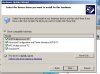
update : tried to install all four possible drivers for processor (see attached), no change: mac still burning (the 100% load on the cpu for prl_vm_app switching between the 2 cores, see attached).

spec reminder:
running leopard 10.5.5 and xp pro sp3 and built PD4 3040.

Hardware Overview:

Model Name: MacBook Pro
Processor Name: Intel Core 2 Duo
Processor Speed: 2.5 GHz
Number Of Processors: 1
Total Number Of Cores: 2
L2 Cache: 6 MB
Memory: 4 GB
Bus Speed: 800 MHz
 

Attachments

  • pro.jpg
    pro.jpg
    68.4 KB · Views: 23
  • core.jpg
    core.jpg
    97.9 KB · Views: 28
Got something... Here is how on core 2 duo macbook pro 2.5 GHz:
1- start pd4 (but not windows).
2- go to configure/cpu->change cpu to 1, press ok and wait till it is updated. restart pd4.
3- go to configure/cpu->change cpu to 2, press ok and wait till it is updated. restart pd4.
4- repeat steps 2 and 3 (don't know why but works).
5- start pd4 and windows: prl_vm_app will spike at startup but then remain below 50%. It is better than before when prl_vm_app would take the whole cpu power while windows did nothing.
However, if an application requires some cpu in windows (powerpoint opening big files, etc), prl_vm_app will still saturate the cpu (which is not normal : I have one of the latest and most powerful macbook pro...).

So, it is a small step but support is still requested.

PS: Do not know whether it matter but I uninstalled my antivirus, ran this cycle (1-5) and only then did I reinstall my antivirus. Also, I had switched my taskbar to the classic version and changed that to the xp version before to run this cycle (1-5). Whether this is of importance is unknown but who knows...
 
Last edited:
not for me

@ patimages: thanks for the tip, but it didn't change anything for me. I still can't figure out how to update the CPU driver in the Windows guest OS - searched the whole system but nothing, nada... not a single clue of where to find that "cpu driver"... where did you take your screenshots in the vm ?
 
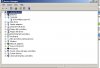
In xp : go to start/settings/control panel
click on system, click on hardware tab and then device manager.
click on first icone on top of the list and then in menu, click action/scan. that will look at problematic device (an exclamation dot would mean wrong driver). you may also do the same by double-clicking computer/"the cpu model that appears" : you are then in the cpu properties. update as you wish.
 
Guys,

Just a small clarification to this:
prl_vm_app process represents guest OS CPU time, which means that
it consumes 100% CPU power only when guest OS consumes
100% CPU power for some reason.

So when we're talking about this problem, the first thing we need to
understand is what happens in the guest (read - Windows).

Can someone suffering from this problem send us screenshot
of Windows Task Manager, showing all processes, sorted by their
CPU usage ?

Regards,
Max
 
nope. this is the first thing I looked at and you should have gotten this info from the report with ID 15253:
the guest os is just fine and does not show any abnormal load when not working. The issue is clearly the host os (the mac) working overtime trying something over and over (prl_vm_app), this leading to an overload.
 
nope. this is the first thing I looked at and you should have gotten this info from the report with ID 15253:
the guest os is just fine and does not show any load when not working. the issue is clearly the host os working overtime trying something over and over and leading to an overload.

The problem is that even when guest OS does not show any
CPU usage in task manager, it still may consume 100% "power"
because it does not issue any CPU power-saving commans
(using HLT itsruction or ACPI state).

Can you please run the following command in your terminal
and post here output for ~10 seconds when your guest is
consuming 100% CPU ?

$ prl_perf_ctl -a -n -l 2
 
Last login: Mon Nov 24 19:38:52 on ttys000
dslb-082-083-025-073:~ pcollom$ rl_perf_ctl -a -n -l 2
-bash: rl_perf_ctl: command not found
dslb-082-083-025-073:~ pcollom$ prl_perf_ctl -a -n -l 2
Performance Counters View Utility v4.0.3540.209168
Copyright 2008 Parallels, Inc.

My Boot Camp - 19:41:11 +2 sec
kernel.ide.irqs 61549
kernel.paging.vcpu0.cr3_change 2
kernel.paging.vcpu0.cr3_write 2
kernel.paging.vcpu0.pf.pagefault 8
kernel.paging.vcpu0.pf.prot 8
kernel.vcpu0.activity.idle_percent 88
kernel.vcpu0.activity.mon_artloop_halt 3
kernel.vcpu0.activity.mon_mcs 369
kernel.vcpu0.activity.quest_acpi_halt 3
kernel.vcpu0.activity.send_halt_msg 3
kernel.vcpu0.guest_switch_vtx 62
kernel.vcpu0.irq_process 30109
kernel.vcpu0.mon_ret_to_host 3
kernel.vcpu0.mon_ret_to_host_switch 3
kernel.vcpu0.pic.setintrequest 167608
kernel.vcpu0.sendapirequest 48409
kernel.vcpu0.vtx_interrupth 224361
kernel.ws.pages 291719
My Boot Camp - 19:41:13 +2 sec
devices.ide0.aligned_writes 18
devices.ide0.unaligned_writes 5
devices.ide0.write_requests 21
devices.ide0.write_total 207360
kernel.ide.irqs 61572
kernel.paging.vcpu0.cr3_change 616
kernel.paging.vcpu0.cr3_write 616
kernel.paging.vcpu0.pf.genexc 17
kernel.paging.vcpu0.pf.pagefault 2773
kernel.paging.vcpu0.pf.prot 2588
kernel.paging.vcpu0.pf.success 168
kernel.vcpu0.activity.idle_percent 87
kernel.vcpu0.activity.mon_artloop_halt 1504
kernel.vcpu0.activity.mon_mcs 200818
kernel.vcpu0.activity.quest_acpi_halt 1397
kernel.vcpu0.activity.send_halt_msg 1501
kernel.vcpu0.async_thr_activate 23
kernel.vcpu0.guest_switch_vtx 22382
kernel.vcpu0.hardware_interrupt 1133
kernel.vcpu0.irq_process 30135
kernel.vcpu0.mon_ret_to_host 3101
kernel.vcpu0.mon_ret_to_host_switch 3101
kernel.vcpu0.pic.setintrequest 169695
kernel.vcpu0.sendapirequest 48420
kernel.vcpu0.vtx_interrupth 224823
kernel.ws.pagein 20
kernel.ws.pages 291739
My Boot Camp - 19:41:15 +2 sec
devices.ide0.aligned_writes 166
devices.ide0.unaligned_writes 21
devices.ide0.write_requests 49
devices.ide0.write_total 681984
kernel.ide.irqs 61627
kernel.paging.vcpu0.cr3_change 631
kernel.paging.vcpu0.cr3_write 631
kernel.paging.vcpu0.pf.genexc 15
kernel.paging.vcpu0.pf.pagefault 3075
kernel.paging.vcpu0.pf.prot 2689
kernel.paging.vcpu0.pf.success 371
kernel.vcpu0.activity.idle_percent 88
kernel.vcpu0.activity.mon_artloop_halt 1518
kernel.vcpu0.activity.mon_mcs 206372
kernel.vcpu0.activity.quest_acpi_halt 1391
kernel.vcpu0.activity.send_halt_msg 1508
kernel.vcpu0.async_thr_activate 53
kernel.vcpu0.guest_switch_vtx 27100
kernel.vcpu0.hardware_interrupt 1100
kernel.vcpu0.irq_process 30192
kernel.vcpu0.mon_ret_to_host 3032
kernel.vcpu0.mon_ret_to_host_switch 3032
kernel.vcpu0.pic.setintrequest 171817
kernel.vcpu0.sendapirequest 48429
kernel.vcpu0.vtx_interrupth 225221
kernel.ws.pagein 11
kernel.ws.pages 291750
My Boot Camp - 19:41:17 +2 sec
devices.ide0.aligned_writes 84
devices.ide0.unaligned_writes 10
devices.ide0.write_requests 9
devices.ide0.write_total 118784
kernel.ide.irqs 61643
kernel.paging.vcpu0.cr3_change 573
kernel.paging.vcpu0.cr3_write 573
kernel.paging.vcpu0.pf.genexc 20
kernel.paging.vcpu0.pf.pagefault 2775
kernel.paging.vcpu0.pf.prot 2577
kernel.paging.vcpu0.pf.success 178
kernel.vcpu0.activity.idle_percent 89
kernel.vcpu0.activity.mon_artloop_halt 1534
kernel.vcpu0.activity.mon_mcs 179573
kernel.vcpu0.activity.quest_acpi_halt 1407
kernel.vcpu0.activity.send_halt_msg 1528
kernel.vcpu0.async_thr_activate 13
kernel.vcpu0.guest_switch_vtx 22057
kernel.vcpu0.hardware_interrupt 933
kernel.vcpu0.irq_process 30210
kernel.vcpu0.mon_ret_to_host 2876
kernel.vcpu0.mon_ret_to_host_switch 2876
kernel.vcpu0.pic.setintrequest 173906
kernel.vcpu0.sendapirequest 48442
kernel.vcpu0.vtx_interrupth 225628
kernel.ws.pagein 25
kernel.ws.pages 291775
My Boot Camp - 19:41:19 +2 sec
devices.ide0.aligned_writes 53
devices.ide0.write_requests 17
devices.ide0.write_total 188416
kernel.ide.irqs 61666
kernel.paging.vcpu0.cr3_change 652
kernel.paging.vcpu0.cr3_write 652
kernel.paging.vcpu0.pf.genexc 14
kernel.paging.vcpu0.pf.pagefault 2881
kernel.paging.vcpu0.pf.prot 2575
kernel.paging.vcpu0.pf.success 292
kernel.vcpu0.activity.idle_percent 89
kernel.vcpu0.activity.mon_artloop_halt 1531
kernel.vcpu0.activity.mon_mcs 187798
kernel.vcpu0.activity.quest_acpi_halt 1402
kernel.vcpu0.activity.send_halt_msg 1523
kernel.vcpu0.async_thr_activate 21
kernel.vcpu0.guest_switch_vtx 22441
kernel.vcpu0.hardware_interrupt 781
kernel.vcpu0.irq_process 30235
kernel.vcpu0.mon_ret_to_host 2699
kernel.vcpu0.mon_ret_to_host_switch 2699
kernel.vcpu0.pic.setintrequest 175993
kernel.vcpu0.sendapirequest 48453
kernel.vcpu0.vtx_interrupth 226015
kernel.ws.pagein 18
kernel.ws.pages 291793
M
 
Back
Top