Hi,
I need immediate help! A while back my Windows updates stopped being able to update. Now, I noticed that my Parallels icon (red || vertical pipes) is gone in the top bar.
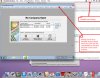
What happens is I double click on the Parallels icon and Windows starts, but when I try to use an application, it can't find the documents to open. For example, QuickBooks, I launch it and it cannot open the QBX file. It does the same with Word or any other application. Also, it is in some strange minimized window, if I go to the full screen, it cuts it off with some black out to either side and the resolution is very low. See image attached.
I've tried to uninstall and reinstall (even application settings) and still no luck. It will not let me uninstall it completely. I'm not a systems expert, so you need to be descriptive in your help. I've read, tried and have been unsuccessful with the following:
http://kb.parallels.com/en/112189
http://kb.parallels.com/en/5029
Thank you,
Donna
I need immediate help! A while back my Windows updates stopped being able to update. Now, I noticed that my Parallels icon (red || vertical pipes) is gone in the top bar.
What happens is I double click on the Parallels icon and Windows starts, but when I try to use an application, it can't find the documents to open. For example, QuickBooks, I launch it and it cannot open the QBX file. It does the same with Word or any other application. Also, it is in some strange minimized window, if I go to the full screen, it cuts it off with some black out to either side and the resolution is very low. See image attached.
I've tried to uninstall and reinstall (even application settings) and still no luck. It will not let me uninstall it completely. I'm not a systems expert, so you need to be descriptive in your help. I've read, tried and have been unsuccessful with the following:
http://kb.parallels.com/en/112189
http://kb.parallels.com/en/5029
Thank you,
Donna