
Install the app
How to install the app on iOS
Follow along with the video below to see how to install our site as a web app on your home screen.
Note: This feature may not be available in some browsers.
You are using an out of date browser. It may not display this or other websites correctly.
You should upgrade or use an alternative browser.
You should upgrade or use an alternative browser.
[in progress] OpenGL 4 Support (list of app titles and their status inside)

alev
Parallels Team
Hello, I'm using EPLAN professionally and there is an issue with 3D display in the 3D layout space. This is due to the fact that the program needs Open GL support.
Is it it?
https://www.eplanusa.com/us/home/
Last edited:
I would like to see support for ArcPro from ESRI. This app has recently been giving me real problems (versions 1.4-2.1) with repeated crashes. Seems to expect OpenGL extensions but I see nowhere to load these. Configure on graphics card just lets me set memory and DirectX10 or 9. Any help suggestions much appreciated

Dmitry Geynisman
Parallels Team
Hi @JeremyA3, am I right that the application itself crashes, but not the virtual machine? Can you please check if you have Windows update KB4055002 installed? There's an evidence that this update cause application crash (https://community.esri.com/thread/207866-arcgis-pro-crash-suspected-windows-update).I would like to see support for ArcPro from ESRI. This app has recently been giving me real problems (versions 1.4-2.1) with repeated crashes. Seems to expect OpenGL extensions but I see nowhere to load these. Configure on graphics card just lets me set memory and DirectX10 or 9. Any help suggestions much appreciated
If this update is not installed, please send us a technical report after the next crash via Help menu > Send Technical Data... > please post the report ID here.
I am considering migrating from parallel desktop to fusionVM despite the better general user-friendliness of parallel because I need to have access to OpenGL 3.3 or greater graphic capabilities (in order to use the 3D functionality of the latest versions of the global mapper software (blue marble)
Could you consider this upgrade?
thanks!
Mathilde
cannat@ipgp.fr
Could you consider this upgrade?
thanks!
Mathilde
cannat@ipgp.fr
Dmitry Geynisman
Parallels Team
rhenriques@dct.uminho.pt-2
Bit poster
Just passed to say that Parallels 14, finally, has a decent Open GL 3 support. Global Mapper works just great. I'm still testing other apps but so far so good.
So late but better late than never. Good Job!
So late but better late than never. Good Job!
Dmitry Geynisman
Parallels Team
Thank you very much, appreciate your feedback!Just passed to say that Parallels 14, finally, has a decent Open GL 3 support. Global Mapper works just great. I'm still testing other apps but so far so good.
So late but better late than never. Good Job!
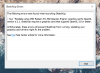
I use Parallels 14 and Open GL3.0 IS NOT SUPPORT !
I try to use google sketchup 2018 and it told me that it couldn't
I use macbook pro touch bar 2016
Radeon Pro 460 4096 MB
Intel HD Graphics 530 1536 MB
please help or am I miss something ?
I try to use google sketchup 2018 and it told me that it couldn't
I use macbook pro touch bar 2016
Radeon Pro 460 4096 MB
Intel HD Graphics 530 1536 MB
please help or am I miss something ?
Attachments
Dmitry Geynisman
Parallels Team
Hi @Mukey#, please send us a technical data report when you see this error, generated via Help menu on menu bar > Send Technical Data...I use Parallels 14 and Open GL3.0 IS NOT SUPPORT !
I try to use google sketchup 2018 and it told me that it couldn't
I use macbook pro touch bar 2016
Radeon Pro 460 4096 MB
Intel HD Graphics 530 1536 MB
please help or am I miss something ?
Please post the report ID here... I have installed SketchUp Pro 2018 and started with no errors, but Style Builder indeed does not open with similar error.
Are you using SketchUp Viewer 2018?
I already submit the report, Report ID : 274469003274469003Hi @Mukey#, please send us a technical data report when you see this error, generated via Help menu on menu bar > Send Technical Data...
Please post the report ID here... I have installed SketchUp Pro 2018 and started with no errors, but Style Builder indeed does not open with similar error.
Are you using SketchUp Viewer 2018?
I am not using SketchUp Viewer.
I already fix it! It my bad... I thought I already upgrade to 14 but I was using 13 all along.Hi @Mukey#, please send us a technical data report when you see this error, generated via Help menu on menu bar > Send Technical Data...
Please post the report ID here... I have installed SketchUp Pro 2018 and started with no errors, but Style Builder indeed does not open with similar error.
Are you using SketchUp Viewer 2018?
Thanks
Dmitry Geynisman
Parallels Team
Good, thank you. Do you notice any changes in SketchUp performance after the upgrade?I already fix it! It my bad... I thought I already upgrade to 14 but I was using 13 all along.
Thanks
I am testing Solid Edge 2019 with Parallels 14 on a MBP Retina 2012, macOS 10.14, Win10 1803 client.
It works well with Intel HD Graphics 4000 (travel mode).
Nvidia GeForce GT 650M is almost unusable but the only solution for using an external monitor.
Rendering tests with OpenGL Extensions Viewer 5.1.4 are good for the Nvidia card: about 220fps for OpenGL 3.0 to 3.3.
Is there a way to get this performance on Solid Edge with the Nvidia card?
Thanks!
It works well with Intel HD Graphics 4000 (travel mode).
Nvidia GeForce GT 650M is almost unusable but the only solution for using an external monitor.
Rendering tests with OpenGL Extensions Viewer 5.1.4 are good for the Nvidia card: about 220fps for OpenGL 3.0 to 3.3.
Is there a way to get this performance on Solid Edge with the Nvidia card?
Thanks!
ChristianH20
Bit poster
I need at least OpenGL 3.2 for running 3D Slicer medical platform software.
alev
Parallels Team
Is it https://www.slicer.org?I need at least OpenGL 3.2 for running 3D Slicer medical platform software.
ChristianH20
Bit poster
Exactly