Internet Not Working on Parallel

RushikeshJ

Bit poster
Hello,

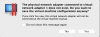
I have installed Parallel on MacBook Air M1 and am facing an issue with the internet connection. The attached error report is the error if I even try to change the network adapter setting.

Please suggest what can be done.
 

Attachments

  • Screenshot 2021-07-26 at 1.36.43 PM.png
    Screenshot 2021-07-26 at 1.36.43 PM.png
    188.3 KB · Views: 73
Hi
Please quit the Parallels Destkop and revert the <UseKextless> flag to the default -1 value. This completely breaks networking on M1 Mac. Upcoming Parallels 17 will completely ignore the flag on Arm.

When flag is reverted to default -1, start the Parallels Desktop and make sure that VM is configured to use Shared Networking. Start the Virtual machine and then go to Parallels Desktop -> Help -> Send Technical Data and send the problem report. Post here its number.
 
hi, I managed to send technical data report, with the same issue on apple M1.
the number report is 375245641.
I would have liked to buy parallels 16 after the trial but...
 
Hi
Please quit the Parallels Destkop and revert the <UseKextless> flag to the default -1 value. This completely breaks networking on M1 Mac. Upcoming Parallels 17 will completely ignore the flag on Arm.

When flag is reverted to default -1, start the Parallels Desktop and make sure that VM is configured to use Shared Networking. Start the Virtual machine and then go to Parallels Desktop -> Help -> Send Technical Data and send the problem report. Post here its number.


hello,
I am facing the same issue and till now I couldn't fix it.. I have tried everything even <UseKexless> flag did not work with me, I've reverted it to the default -1. I also tried to uninstall the application and download it again. I have even purchase the full version to solve this issue and also nothing changed. Please advise as I need this problem to be solved as soon as possible .. |
My technical report number is 375418293

Thanks in advance
 
I recently installed Parallels Desktop and my internet was alright until an hour back. Now, it says "No internet access" despite restarting. What could be wrong? I can access internet from my macOS desktop though.
 
Back
Top