I run a number of different Windows 10 VMs with expanding disks, and the bloat (difference between the c-drive and v-hdd size) varies quite a lot. Here are two examples (No snapshots):
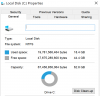
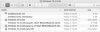
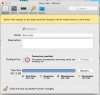
Low bloat: c-drive 19.5GB, Total size in Config/General: 20.9GB, PVM: 22.4GB
High bloat: c-drive 19.3GB, Total size in Config/General: 24.1GB, PVM: 25.87GB
As I run quite a lot of VM for different users and clone them for new installations, any bloat makes backups and limited SSD space is a real pain. I have tried to compress and optimise everything I can think of, in Windows 10, and in Parallels Desktop, with Reclaim and the extra 3GB of bloat is really annoying me in some of these.
Please can someone tell me what it is and how I can manage it down?
Most of the VMs are run in PD11, but I tested a high bloat one in PD13, and also found I could not reduce it.
Thanks
Low bloat: c-drive 19.5GB, Total size in Config/General: 20.9GB, PVM: 22.4GB
High bloat: c-drive 19.3GB, Total size in Config/General: 24.1GB, PVM: 25.87GB
As I run quite a lot of VM for different users and clone them for new installations, any bloat makes backups and limited SSD space is a real pain. I have tried to compress and optimise everything I can think of, in Windows 10, and in Parallels Desktop, with Reclaim and the extra 3GB of bloat is really annoying me in some of these.
Please can someone tell me what it is and how I can manage it down?
Most of the VMs are run in PD11, but I tested a high bloat one in PD13, and also found I could not reduce it.
Thanks