"Launch Parallels Desktop" Message Stuck!!!

ColquittE

Bit poster
When launching Parallels Desktop 16 for Mac, I get this message:
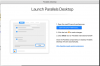
1.PNG

Unfortunately, when going into Security Preferences, the "allow" button doesn't exist...
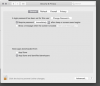
2.PNG
Firewall is off and I've verified permission in Privacy
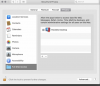
4.PNG
3.PNG

Here's my version:
5.PNG

Parallels technical support is AWFUL. Chat was no help, said someone would reach out via email. Never got an email and the case was closed. Reopened case haven't heard back.
 
Thanks for your reply! Unfortunately, I have already found that article and it is not the case. The "Allow" button does not show up at all, as mentioned in my original post. I am not receiving the "System Extension Blocked" message as mentioned in the article. I still have not had any reply to my case # 2980856 or # 2980871.

When this same issue happened last year, this was the message from the tech on the case who resolved it. I have no idea what terminal command we used though.

"During the remote session, we checked the permissions settings and found that the system extension is enabled for the application but still access is denied by the mac. We uninstalled the application, fixed the permissions issues with terminal command and reinstalled the application. We confirmed that it is starting and working fine."
 
I've already wasted an hour trying everything suggested, and I still get the error. I can't find the terminal commands referred to "During the remote session, we checked the permissions settings and found that the system extension is enabled for the application but still access is denied by the mac. We uninstalled the application, fixed the permissions issues with terminal command and reinstalled the application. We confirmed that it is starting and working fine." This is ridiculous.
 
I've already wasted an hour trying everything suggested, and I still get the error. I can't find the terminal commands referred to "During the remote session, we checked the permissions settings and found that the system extension is enabled for the application but still access is denied by the mac. We uninstalled the application, fixed the permissions issues with terminal command and reinstalled the application. We confirmed that it is starting and working fine." This is ridiculous.
Hello, are you running the latest Parallels Desktop version?
 
Back
Top