Lightdm greeter login wrong resolution after PD Tools install

JorgeN1

Bit poster
Hi everyone!
I'm facing this after installation of PD Tools over Linux Mint 20, on MacBookPro 13 inch with Catalina. Please see attached file.
Instead of previous resolution 2048x1280 I have now much less than that and the image doesn't occupy the rest of the screen.
Where in LM20 can I change the login resolution of the greeter?
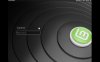
LM20.jpg
Thanks for your time!
Jorge
 
I found a basic workaround that works consummately for me running 13.04. (update: presently 13.10) on a PC with a 24" outer screen that isn't forever associated.
Please, can you describe your workaround? Im having same issue - after PT install and reboot lightdm switch to 1024x768 if I'm on fullscreen...
 
It affects all the display managers based on my testing. I observed it gdm, kdm and sddm and the distro didn't matter. Seems like the xorg preferred mode for the display manager is 1024x768 and the resolution switching only activates when the window manager is running. I tried a number of things and nothing worked. I think it's a parallels problem. I opened a ticket but my experience with their support is less than stellar.

https://forum.parallels.com/threads...-1024x768-versus-fullscreen-1792x1120.353628/
 
I noticed my Ubuntu VM would do this if I opened in fullscreen. For me it worked to exit fullscreen to a smaller resolution where it would fill the window and then enable fullscreen again.

Hope they make the necessary configuration change to fill whatever the current screen size is.
 
Back
Top