
My Windows 10 installation was working perfectly in Parallels 10.4.0.
Following recent automatic updates to the OS, I found that Windows was automatically set to Airplane mode and had locked out all Mac network folders within Windows. Finding no other solution I had reset Windows to the last working version. This all occurred on Tues 17 Jan.
My Windows now finding the network files, but my laptop keyboard now will not operate in Windows. My trackpad works and my USB mouse work. I have also tried a USB keyboard with no success.
I tried the following as set out in the support online:
1. Changing the configuration in the parallels tool settings for the keyboard
2. Uninstalling the drivers in Device Manager
3. Uninstalling and reinstalling Parallel Tools with the Windows Defender turned off.
4. Checking the System registry and updating the following:
HKEY_LOCAL_MACHINE\SYSTEM\CurrentControlSet\services\i8042prt to 1 or 3
Screenshot of the Device Manager is attached.
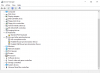
From Device Manager:
A driver (service) for this device has been disabled. An alternate driver may be providing this functionality. (Code 32)
Event log is showing an error loading keyboard.inf
Having run out of options please advise so I can try and resolve ASAP.
Parallels online support
Also when trying to submit a support email, I have been notified that my support code is not correct even though this has been copied directly from my subscription page. Therefore not currently able to send a support request.
Many thanks
Following recent automatic updates to the OS, I found that Windows was automatically set to Airplane mode and had locked out all Mac network folders within Windows. Finding no other solution I had reset Windows to the last working version. This all occurred on Tues 17 Jan.
My Windows now finding the network files, but my laptop keyboard now will not operate in Windows. My trackpad works and my USB mouse work. I have also tried a USB keyboard with no success.
I tried the following as set out in the support online:
1. Changing the configuration in the parallels tool settings for the keyboard
2. Uninstalling the drivers in Device Manager
3. Uninstalling and reinstalling Parallel Tools with the Windows Defender turned off.
4. Checking the System registry and updating the following:
HKEY_LOCAL_MACHINE\SYSTEM\CurrentControlSet\services\i8042prt to 1 or 3
Screenshot of the Device Manager is attached.
From Device Manager:
A driver (service) for this device has been disabled. An alternate driver may be providing this functionality. (Code 32)
Event log is showing an error loading keyboard.inf
Having run out of options please advise so I can try and resolve ASAP.
Parallels online support
Also when trying to submit a support email, I have been notified that my support code is not correct even though this has been copied directly from my subscription page. Therefore not currently able to send a support request.
Many thanks
