
Install the app
How to install the app on iOS
Follow along with the video below to see how to install our site as a web app on your home screen.
Note: This feature may not be available in some browsers.
You are using an out of date browser. It may not display this or other websites correctly.
You should upgrade or use an alternative browser.
You should upgrade or use an alternative browser.
MASSIVE decrease in performance after upgrading to 3.0
- Thread starter dschmidt
- Start date
NeoDynamic
Bit poster
Hi Stacey,
Thanks for the update. I'll look at re-installing 5582 soon and decreasing the memory however I have to tell you, for the work I do that 512 MB is not enough memory and 1GB is the bare minimum. I've been using parrallels for close to 12 months now and have always used 1.5GB of memory without any problems.
I do have a suggestion though. If you note my post on the 19th of Dec you'll see that I'm saying even after a rollback that there are problems (not as frequent though) even though I rolled back to 4560. Given I had not made any Windows OS changes to my VM I believe there may be something that the 5582 installer is doing differently. Are there any changes to the installation between 4560 & 5582?
Thanks in advance...
Thanks for the update. I'll look at re-installing 5582 soon and decreasing the memory however I have to tell you, for the work I do that 512 MB is not enough memory and 1GB is the bare minimum. I've been using parrallels for close to 12 months now and have always used 1.5GB of memory without any problems.
I do have a suggestion though. If you note my post on the 19th of Dec you'll see that I'm saying even after a rollback that there are problems (not as frequent though) even though I rolled back to 4560. Given I had not made any Windows OS changes to my VM I believe there may be something that the 5582 installer is doing differently. Are there any changes to the installation between 4560 & 5582?
Thanks in advance...
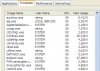
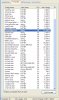
Screenshots Stacey requested
Stacey,
Here are the screenshots you asked for.
Thanks.
Stacey,
Here are the screenshots you asked for.
Thanks.
Attachments
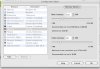
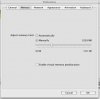
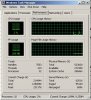
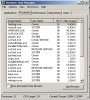
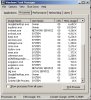
Here are my screenshots.
I have 2 GB of RAM total on this MacBook running 10.5.1. 2.16 GHz Intel Core 2 Duo.
I had 1 GB dedicated to Windows XP when I took the screenshots. I tried what was posted here and reduced to 512 MB for XP, but the problem I'm having still occurs.
It happens when I close a window inside Windows XP. The virtual machine locks up for about 5-10 seconds. It doesn't happen with every window I close, and I haven't found a discernible pattern yet. I get the pinwheel for that period of time, then everything begins responding again. OS X doesn't lock up...just Parallels Desktop 3.0 Build 5582!
I have 2 GB of RAM total on this MacBook running 10.5.1. 2.16 GHz Intel Core 2 Duo.
I had 1 GB dedicated to Windows XP when I took the screenshots. I tried what was posted here and reduced to 512 MB for XP, but the problem I'm having still occurs.
It happens when I close a window inside Windows XP. The virtual machine locks up for about 5-10 seconds. It doesn't happen with every window I close, and I haven't found a discernible pattern yet. I get the pinwheel for that period of time, then everything begins responding again. OS X doesn't lock up...just Parallels Desktop 3.0 Build 5582!
Attachments
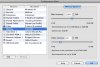
Eru Ithildur
Forum Maven
randall and Mattbaker,
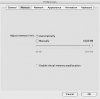
Here is a shot... In your preferences change the memory setting to manual and set the memory to 1 GB, see if that helps. You could also try tweaking with the 'enable memory preallocation'.
Also, what is the CPU usage (check your Activity Monitor on OS X) when this temporary rogue state hits.
Here is a shot... In your preferences change the memory setting to manual and set the memory to 1 GB, see if that helps. You could also try tweaking with the 'enable memory preallocation'.
Also, what is the CPU usage (check your Activity Monitor on OS X) when this temporary rogue state hits.
I tried Eru Ithildur's suggestions but am still having the problem.
I tried moving the VM's memory as low as 384 and as high as 1024, in combination with the "Manual" and "Automatic" settings under the Parallels Preferences. None of the combinations I tried made the problem go away.
The problem doesn't seem to be linked to CPU usage. I monitored it closely as the problem has continued happening, and I cannot see a correlation.
I tried moving the VM's memory as low as 384 and as high as 1024, in combination with the "Manual" and "Automatic" settings under the Parallels Preferences. None of the combinations I tried made the problem go away.
The problem doesn't seem to be linked to CPU usage. I monitored it closely as the problem has continued happening, and I cannot see a correlation.
Eru Ithildur
Forum Maven
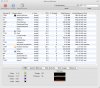
What is the actual CPU usage numbers? They might be useful.
Eru Ithildur
Forum Maven
Interesting, Parallels is grabbing 3.24GB of VM, how much VM do you have available? How much free space do you have available?


Eru Ithildur
Forum Maven
You have 40GB of VM... That's... A lot.
How much free space do you have when you first start up your computer and how much VM is used?
It sounds to me as if the VM is exceeding the available space, causing a hang, it might be due to a leak in Parallels, Safari, other applications, or some combination. Plausible? I think so.
How much free space do you have when you first start up your computer and how much VM is used?
It sounds to me as if the VM is exceeding the available space, causing a hang, it might be due to a leak in Parallels, Safari, other applications, or some combination. Plausible? I think so.
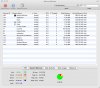
I shut down the virtual machine, shut down Leopard, booted up Leopard, and took a fresh screenshot (8.jpg). It still shows 40 GB of VM size.
I checked with a colleague and he has noticed that his VM size is like this, also (attachment titled "VM.jpg").
Maybe that's just a Leopard thing?
I checked with a colleague and he has noticed that his VM size is like this, also (attachment titled "VM.jpg").
Maybe that's just a Leopard thing?
Attachments

Networking issues or hard drive issue?
I am also having slowdowns on Windows XP. I have MacBook Pro 2.33ghz/4gb ram with PDM 5582. I have been using Parallels for a little over a year, and have been at this version since the date it was released.
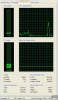
All of a sudden, my system got very slow; I started looking for causes, and did my normal maintenance including making sure I have free space on my Bootcamp paritition and doing a Norton Systemworks Speed Disk as I have been doing. I checked my CPU Usage using Task Manager, and it showed a steady 100%!!! I tried closing processes, and still 100%. Finally I started disabling Parallels services one by one, and although when I disconnected from the network it gave me a momentary lessening of CPU usage, it jumped back up after a few seconds.
Then I started to look to see if my well-intentioned maintenance may be causing ill effects. I am now doing a Windows XP Disk Defrag, and my CPU Usage during the Defrag is MUCH less - Perhaps it is a process continually reading and writing to the disk which is causing the problem - or perhaps Norton SystemWorks is doing something to the partition.
Just my temporary 2 cents worth... I'll come back with more info when the defrag is done ... and when I know if the CPU usage stays down... (currently from 6 to 30 % - a huge difference!).
My VM has 672 MB of Memory with a Adjusted memory limit set to "Automatically" and "Enable virtual memory preallocation".
Added: My WINDOWS XP Disk Defrag (as against other defragmenter) finished, and low and behold, my CPU Usage is now at a range of around 3-6% with an occasional 15 or so! Perhaps 3rd party defragmentation actually is dangerous to use with Parallels 5582??
I am also having slowdowns on Windows XP. I have MacBook Pro 2.33ghz/4gb ram with PDM 5582. I have been using Parallels for a little over a year, and have been at this version since the date it was released.
All of a sudden, my system got very slow; I started looking for causes, and did my normal maintenance including making sure I have free space on my Bootcamp paritition and doing a Norton Systemworks Speed Disk as I have been doing. I checked my CPU Usage using Task Manager, and it showed a steady 100%!!! I tried closing processes, and still 100%. Finally I started disabling Parallels services one by one, and although when I disconnected from the network it gave me a momentary lessening of CPU usage, it jumped back up after a few seconds.
Then I started to look to see if my well-intentioned maintenance may be causing ill effects. I am now doing a Windows XP Disk Defrag, and my CPU Usage during the Defrag is MUCH less - Perhaps it is a process continually reading and writing to the disk which is causing the problem - or perhaps Norton SystemWorks is doing something to the partition.
Just my temporary 2 cents worth... I'll come back with more info when the defrag is done ... and when I know if the CPU usage stays down... (currently from 6 to 30 % - a huge difference!).
My VM has 672 MB of Memory with a Adjusted memory limit set to "Automatically" and "Enable virtual memory preallocation".
Added: My WINDOWS XP Disk Defrag (as against other defragmenter) finished, and low and behold, my CPU Usage is now at a range of around 3-6% with an occasional 15 or so! Perhaps 3rd party defragmentation actually is dangerous to use with Parallels 5582??
Eru Ithildur
Forum Maven
What display mode are you using? Does it make any difference which mode you use?
Eru Ithildur
Forum Maven
No,no the parallels display mode, i.e. coherence or single window os