Hi,
Installed a new VM with Windows7 and I have a question about Networking.
It tells me on the right bottom side in the taskbar of Windows that I have no Internet access.
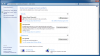
When I click on the troubleshooter it gives me a graphical presentation of the network:
Home Computer ----- Network ----X----- Internet
When I click on the X then it tells me (after 2 minutes of Detecting.....) to check if my cables are attached, etc. the well-known Windows Troubleshooter Blackhole, nothing new here.
However, as you can see I am writing this message using this new setup and have great connectivity to the Internet so I am puzzled what Win7/Parallels experts can tell me how to solve this annoying icon
It is not a problem just annoying to see the network icon with the "!" in it that should not be there.
or....
Is this just another "feature" of Win7 together with Parallels.
One thought is that Win7 does not recognize the Virtual Network Interfaces of Parallels....
Thanks for an answer.
Hans.
Installed a new VM with Windows7 and I have a question about Networking.
It tells me on the right bottom side in the taskbar of Windows that I have no Internet access.
When I click on the troubleshooter it gives me a graphical presentation of the network:
Home Computer ----- Network ----X----- Internet
When I click on the X then it tells me (after 2 minutes of Detecting.....) to check if my cables are attached, etc. the well-known Windows Troubleshooter Blackhole, nothing new here.
However, as you can see I am writing this message using this new setup and have great connectivity to the Internet so I am puzzled what Win7/Parallels experts can tell me how to solve this annoying icon
It is not a problem just annoying to see the network icon with the "!" in it that should not be there.
or....
Is this just another "feature" of Win7 together with Parallels.
One thought is that Win7 does not recognize the Virtual Network Interfaces of Parallels....
Thanks for an answer.
Hans.