Parallels Tools do not compile with kernels 2.6.39 and 3.0

DRemesov

Bit poster
Hello

Building of Parallels Tools using kernel headers 2.6.39 and 3.0 fails with

/usr/lib/parallels-tools/kmods/prl_fs/SharedFolders/Guest/Linux/prl_fs/super.c: In function ‘prlfs_get_sb’:
/usr/lib/parallels-tools/kmods/prl_fs/SharedFolders/Guest/Linux/prl_fs/super.c:247:2: error: implicit declaration of function ‘get_sb_nodev’
/usr/lib/parallels-tools/kmods/prl_fs/SharedFolders/Guest/Linux/prl_fs/super.c: At top level:
/usr/lib/parallels-tools/kmods/prl_fs/SharedFolders/Guest/Linux/prl_fs/super.c:264:2: error: unknown field ‘get_sb’ specified in initializer
/usr/lib/parallels-tools/kmods/prl_fs/SharedFolders/Guest/Linux/prl_fs/super.c:264:2: warning: initialization makes integer from pointer without a cast
/usr/lib/parallels-tools/kmods/prl_fs/SharedFolders/Guest/Linux/prl_fs/super.c:264:2: error: initializer element is not computable at load time
/usr/lib/parallels-tools/kmods/prl_fs/SharedFolders/Guest/Linux/prl_fs/super.c:264:2: error: (near initialization for ‘prl_fs_type.fs_flags’)

In kernel 2.6.39 function get_sb_nodev is deprecated and field get_sb in file_system_type structure is deprecated too
 
On 3.0 it compiles but makes kernel oops on loading prl_tg
BTW the patch has an inconsistency in prl_freeze/prl_fs_freeze.c
kern_path accepts struct path* as parameter 3
 
On 3.0 it compiles but makes kernel oops on loading prl_tg
BTW the patch has an inconsistency in prl_freeze/prl_fs_freeze.c
kern_path accepts struct path* as parameter 3

Thank you. I found a subsequent article that resolved that issue. The parameter should be changed from: &nd to &(nd.path).
 
Install on Ubuntu 11.10 Alpha (Linux 3.0.0)

I just downloaded the latest "current" build of Ubuntu 11.10. It currently has Linux 3.0.0-7. After applying my patch I was able to reboot and Parallels seems to think its tools are loaded.

Looking at the install log it appears that everything compiled fine and the install passed, but there was a problem with the DKMS modules. I don't now if that is because of something to do with Parallels Tools of because I am using Alpha software.

The main parallels log shows this on restart:

Output of show_vm_cfg utility: opengl-support: 1
Found OpenGL support in host; set up OpenGL libs in guest
Parallels OpenGL libs are installed
Loading Parallels ToolsGate driver: done
Loading Parallels Network driver: done
Loading Parallels Shared Folders driver: done
Mounting Parallels Shared Folders: done
Loading Parallels Filesystem Freeze driver: done
Loading Parallels Paravirt driver: done
Starting Parallels tools daemon: done

There will undoubtedly be an official update, probably after 11.10 is released, but it looks like my patch takes care of most of the issues for 2.36.9 and 3.0.0. YMMV.

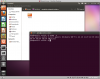
Attached is a screen shot.
 

Attachments

  • Ubuntu 11.10 Screenshot.png
    Ubuntu 11.10 Screenshot.png
    228.5 KB · Views: 42
Thank you. I found a subsequent article that resolved that issue. The parameter should be changed from: &nd to &(nd.path).

u mean both this line ? both need to be change ? and how about the kernel version ?

- err = path_lookup(path, LOOKUP_FOLLOW, &nd);
+#if LINUX_VERSION_CODE >= KERNEL_VERSION(2, 6, 39)
+ err = kern_path(path, LOOKUP_FOLLOW, &(nd.path));
+#else
+ err = path_lookup(path, LOOKUP_FOLLOW, &nd);
+#endif
 
I just downloaded the latest "current" build of Ubuntu 11.10. It currently has Linux 3.0.0-7. After applying my patch I was able to reboot and Parallels seems to think its tools are loaded.

Looking at the install log it appears that everything compiled fine and the install passed, but there was a problem with the DKMS modules. I don't now if that is because of something to do with Parallels Tools of because I am using Alpha software.

The main parallels log shows this on restart:


There will undoubtedly be an official update, probably after 11.10 is released, but it looks like my patch takes care of most of the issues for 2.36.9 and 3.0.0. YMMV.

Attached is a screen shot.

mind to share / post your patch here ?
 
$ patch -p1 < parallels_patch.txt
patching file installer/detect-xserver.sh
patching file kmods/prl_fs/SharedFolders/Guest/Linux/prl_fs/super.c
Hunk #1 FAILED at 240.
Hunk #2 FAILED at 260.
2 out of 2 hunks FAILED -- saving rejects to file kmods/prl_fs/SharedFolders/Guest/Linux/prl_fs/super.c.rej
patching file kmods/prl_fs_freeze/Snapshot/Guest/Linux/prl_freeze/prl_fs_freeze.c
Hunk #1 FAILED at 55.
1 out of 1 hunk FAILED -- saving rejects to file kmods/prl_fs_freeze/Snapshot/Guest/Linux/prl_freeze/prl_fs_freeze.c.rej
patching file kmods/prl_pv/Paravirt/Guest/Linux/pv_main.c
Hunk #1 FAILED at 51.
1 out of 1 hunk FAILED -- saving rejects to file kmods/prl_pv/Paravirt/Guest/Linux/pv_main.c.rej
 
Yes... I am using 6.0.12094, and starting with a copy of their tools.

Did you unzip and untar the kmods/prl_mod.tar.gz file?

I just ran the same command in my Chakra environment and all patches worked.

[john@chakra-pc parallels-patch]$ sudo patch -p1 < parallels_patch.txt
patching file installer/detect-xserver.sh
patching file kmods/prl_fs/SharedFolders/Guest/Linux/prl_fs/super.c
patching file kmods/prl_fs_freeze/Snapshot/Guest/Linux/prl_freeze/prl_fs_freeze.c
patching file kmods/prl_pv/Paravirt/Guest/Linux/pv_main.c
 
version 6.0.12094
Artifacts are still there in ubuntu 11.04 using just kernel from 11.10
so it's not the kernel issue
 
Is this patch also usable for Parallels 5 or bound to version 6???

Is it also needed for a kernel 2.6.37.6?
 
Last edited:
I see.
I figured now that it is PD5 which is really and very likely never will support current OpenSUSEs. :-(
PD5 users are forced to upgrade to PD6.
 
I just downloaded the latest "current" build of Ubuntu 11.10. It currently has Linux 3.0.0-7. After applying my patch I was able to reboot and Parallels seems to think its tools are loaded.

Looking at the install log it appears that everything compiled fine and the install passed, but there was a problem with the DKMS modules. I don't now if that is because of something to do with Parallels Tools of because I am using Alpha software.

The main parallels log shows this on restart:


There will undoubtedly be an official update, probably after 11.10 is released, but it looks like my patch takes care of most of the issues for 2.36.9 and 3.0.0. YMMV.

Attached is a screen shot.

I made your patch work for ubuntu 11.10 w/kernel 3.0.0-9. However gdm fails to start. I tried what the poster in the gnome3 thread stated to do : i.e. create a symlink from /bin/true to /usr/lib/gnome-session/gnome-session-check-accelerated-helper

Error I am receiving is the following:
from /var/log/gdm/:0.log -> error setting MTRR (base =0xb0000000, size=0x08000000, type=1) Invalid argument (22).

Any ideas?
 
I didn't experience any major issues:

1) Download 11.10 daily build - oneiric-desktop-amd64+mac.iso
2) Install inside Parallels 6.0.12094
3) ln -s /usr/lib /usr/lib64
4) Mount parallels tools
5) Create a working directory
6) Copy parallels tools to working directory
7) unzip and untar kmods directory
8) install patch package
9) Download patch file (http://forum.parallels.com/showpost.php?p=452934&postcount=6) to working directory
10) Apply patch
11) Run install from working directory
12) Reboot
13) Install gnome-shell and gnome-session packages
13) Reboot
14) Choose GNOME session and login

I see the Gnome 3 desktop, and I didn't need to create a bin/true symlink.

NOTE: I didn't try to resolve my DKMS issue. My parallels-tool-install.log still reports that the DKMS modules were not added.

EDIT: The most recent versions of 11.10 use LightDM instead of GDM.
 
Last edited:
I applied the patch, when i try to run the installer it says:
./install: line 451: ./installer/installer.x86_32: Permission denied
It has executable bit.
 
The patch JEarles provided works, but it wasn't working for me on Build 6.0.12106.

After reading the installer script I realized I had to re-tar up the kmods directory after applying the patch. I basically did something like this:

cd kmods
tar xzf prl_mod.tar.gz
mv prl_mod.tar.gz ..
cd ..
patch -p1 < /path/to/parallels_patch.txt
cd kmods
tar czf /tmp/prl_mod.tar.gz *
rm -rf *
mv /tmp/prl_mod.tar.gz .
cd ..
./install

Hope this helps someone else.
 
Back
Top