
Install the app
How to install the app on iOS
Follow along with the video below to see how to install our site as a web app on your home screen.
Note: This feature may not be available in some browsers.
You are using an out of date browser. It may not display this or other websites correctly.
You should upgrade or use an alternative browser.
You should upgrade or use an alternative browser.
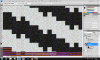
Photoshop cs4 unuseable
- Thread starter Airsport
- Start date
Hi Airsport,
what do you mean by mentioning that latest video driver is installed? Parallels Tools provide video driver that should be used in a virtual machine. Are you using Parallels Desktop 4 or 5? Please try the troubleshooting steps below:
1. Remove Parallels Tools from Programs list, restart VM, install Parallels Tools from Virtual Machine menu.
2. Disable Shared Profile in Virtual Machine > Configure ... Options tab
3. In Virtual Machine menu > Configure... > Hardware tab > Video try to increase video memory, enable 3D acceleration and vertical synchronization.
what do you mean by mentioning that latest video driver is installed? Parallels Tools provide video driver that should be used in a virtual machine. Are you using Parallels Desktop 4 or 5? Please try the troubleshooting steps below:
1. Remove Parallels Tools from Programs list, restart VM, install Parallels Tools from Virtual Machine menu.
2. Disable Shared Profile in Virtual Machine > Configure ... Options tab
3. In Virtual Machine menu > Configure... > Hardware tab > Video try to increase video memory, enable 3D acceleration and vertical synchronization.
Hi Airsport,I installed the latest windows video driver after the install of parallel tools
this is exactly what confuses me the most. Parallels Tools already contain video driver optimized for Parallels Desktop virtual machines. What driver exactly have you installed? Please make a screenshot of Device Manager with expanded Display Adapters part and attach it here.
I had this problem with the driver that came with parallels tools. So I tried changing to the latest driver. I've since gone back to the parallel driver and still have the same issue. No problem when I boot via bootcamp with CS4.
Also lightroom 3 works fine in bootcamp and parallel...
Also lightroom 3 works fine in bootcamp and parallel...
Shaddam IV
Forum Maven
I suggest you de-install the Parallels tools, and re-install them. Make sure you have the most recent version. That should make sure you're using the latest Parallels video driver.
What other software or service are you using that could possibly interfere with PS? What's your setup - have you got one or several monitors connected to your Mac?
What other software or service are you using that could possibly interfere with PS? What's your setup - have you got one or several monitors connected to your Mac?
I suggest you de-install the Parallels tools, and re-install them. Make sure you have the most recent version. That should make sure you're using the latest Parallels video driver.
What other software or service are you using that could possibly interfere with PS? What's your setup - have you got one or several monitors connected to your Mac?
Did all the above...I have used it with a second monitor and solo with the same results.
Driver info
Parallels display adapter (WDDM)
driver date 3/2/2010
Driver Version 5.0.9344.0
P
Parallels User
>>> Message has been deleted by the user <<<
kiiiillers
Bit poster
Opening PNG's in CS4
Ok I have fixed my problem by doing the steps above, I have the same version of Parallels drivers, and then I turned off "Enable OpenGL Drawing" in CS4 Photoshop\Edit\Preferences\Performance.
Does anyone know if they was able to "Enable OpenGL Drawing" and then tweaking the settings in the Advanced Settings... to get it working?
Thanks,
kiiiillers
Ok I have fixed my problem by doing the steps above, I have the same version of Parallels drivers, and then I turned off "Enable OpenGL Drawing" in CS4 Photoshop\Edit\Preferences\Performance.
Does anyone know if they was able to "Enable OpenGL Drawing" and then tweaking the settings in the Advanced Settings... to get it working?
Thanks,
kiiiillers
kiiiillers
Bit poster
I was able to fix my problem by just disabling "Enable OpenGL Drawing" in CS4 under Edit\Preferences\Performance. Now I have not tried turning it on and then tweaking the settings in the "Advanced Settings..." in that same dialog. I will try tweaking the settings. I also turned back on Shared Profile and it works fine with "Enable OpenGL Drawing" turned off.
kiiiillers
kiiiillers
bartenderonduty
Bit poster
I am also experiencing the exact same problem with Photoshop CS4 when using it through Parallels.
I have tried reinstalling Parallels, shared Profile in VM was already disabled by default, and the video memory was already maxed out by default.
kiiiilers' suggestion worked like a charm, but I would prefer to have OpenGL enabled. Are there any fixes for this issue yet?
I have tried reinstalling Parallels, shared Profile in VM was already disabled by default, and the video memory was already maxed out by default.
kiiiilers' suggestion worked like a charm, but I would prefer to have OpenGL enabled. Are there any fixes for this issue yet?
Same problem with CS5
I have the same problem in Photoshop CS5. RAW images open just fine in Camera RAW but when opened into Photoshop the image is trashed. I temporarily fixed it by reinstalling Parallels Tools but only temporarily. The problem returned a day later and subsequent attempts at reinstalling Tools offered no relief. I submitted a problem report over a week ago, including screen shot and all configuration info captured by the reporting system.
BTW, I have installed both Win7 and CS5 as 32 bit. Would going to 64 bit help or hinder the problem?
I have the same problem in Photoshop CS5. RAW images open just fine in Camera RAW but when opened into Photoshop the image is trashed. I temporarily fixed it by reinstalling Parallels Tools but only temporarily. The problem returned a day later and subsequent attempts at reinstalling Tools offered no relief. I submitted a problem report over a week ago, including screen shot and all configuration info captured by the reporting system.
BTW, I have installed both Win7 and CS5 as 32 bit. Would going to 64 bit help or hinder the problem?
bartenderonduty
Bit poster
64-bit Windows will not fix the problem - I tried it on 64-bit with no luck.
I have the same problem.
I have a new Mac Mini, Intel Core 2 Duo, Nvidea 320M GPU. Installed Parallels 6 and Windows 7 64bit. I cannot have Enable OpenGL checked in either Photoshop 32 bit or 64bit. If you enable OpenGl, the screen is completely frazzled when you open any graphic. Disable OpenGL and Photoshop runs fine....except of course you have no GPU support.
Any word on GPU support for Photoshop CS4? Any word at all from the Parallels team?
Thanks
Allan
I have a new Mac Mini, Intel Core 2 Duo, Nvidea 320M GPU. Installed Parallels 6 and Windows 7 64bit. I cannot have Enable OpenGL checked in either Photoshop 32 bit or 64bit. If you enable OpenGl, the screen is completely frazzled when you open any graphic. Disable OpenGL and Photoshop runs fine....except of course you have no GPU support.
Any word on GPU support for Photoshop CS4? Any word at all from the Parallels team?
Thanks
Allan
Last edited: