Scrolling Issue and no Boot Camp option.

Ryder Cragie

Junior Member
I have two issues. One is that I don't see the option to use Boot Camp with Parallels. The other issue is the scrolling seems to be too quick. I've changed the number of lines to scroll from 3 to one but it seems to be scrolling two lines at a time as it always has done. I 'd prefer it to be one if possible, and I've already checked for a smooth scrolling option but there doesn't seem to be one in the VM configuration. Any help on either or both of these issues would be much appreciated. Thanks!
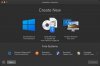
 
The Boot Camp article doesn't help as it doesn't explain why I'm not seeing the Boot Camp option at all. And the 2nd article you linked also doesn't help. Interior scrolling or "don't optimise for games" make no difference at all.
 
No one said anything about an error. But here's a screenshot showing that I don't see the Boot Camp option.
 

Attachments

  • Screenshot 2021-12-03 at 23.12.46.jpg
    Screenshot 2021-12-03 at 23.12.46.jpg
    193.2 KB · Views: 3
No one said anything about an error. But here's a screenshot showing that I don't see the Boot Camp option.
On a screen shot I see "Get Windows 10"
I guess you are not not using latest version of Parallels Desktop and you are on mac OS Monterey? If so, it doesn't work.
 
I'm using Parallels 17.1.1 with macOS Monterey. I'm not sure why it says "Get Windows 10" because I am using it right now with Parallels (which is where I'm having the scrolling issue.)
 
Oh, my bad. I thought Parallels could install a VM into Boot Camp for you. Sorry for the confusion. Any help with the scrolling issue though please? It's very frustrating.
 
Back
Top