[SOLVED] Can't install Parallels Tools

TiefiSnh

Bit poster
Windows 10 Pro
Parallels 17.1.1

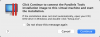
Whenever I install Parallels Tools I get window in attachment 1. When I click OK, then I immediately get the window in attachment 2. The DVD never shows up in File Explorer. I restart and nothing happens. I have followed the steps in this article: https://kb.parallels.com/8969 and still can't get it to see the DVD.
 

Attachments

  • 1.png
    1.png
    73.7 KB · Views: 8
  • 2.png
    2.png
    48.3 KB · Views: 8
Windows 10 Pro
Parallels 17.1.1

Whenever I install Parallels Tools I get window in attachment 1. When I click OK, then I immediately get the window in attachment 2. The DVD never shows up in File Explorer. I restart and nothing happens. I have followed the steps in this article: https://kb.parallels.com/8969 and still can't get it to see the DVD.

Hi, after restarting virtual machine are you still getting this pop up?
 
Hi, after restarting virtual machine are you still getting this pop up?
I don't get any pop ups. I cannot install Parallels Tools at all. Whenever I go to install the tools, I get attachment 1. Whenever I click "OK", I immediately get attachment 2. It never shows up as a CD/DVD in File Explorer in Windows so I can never install it.
 
Is there a place I can manually download Parallels Tools iso? It looks like our company policy is set to block CD/DVD drives, which explains why it might not be showing up. (I have yet to confirm this yet)
Never mind. I was able to take the ISO, put it on a USB drive and install it in Parallels that way.
 
Back
Top