Windows 10 Pro
Parallels 17.1.1
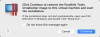
Whenever I install Parallels Tools I get window in attachment 1. When I click OK, then I immediately get the window in attachment 2. The DVD never shows up in File Explorer. I restart and nothing happens. I have followed the steps in this article: https://kb.parallels.com/8969 and still can't get it to see the DVD.
Parallels 17.1.1
Whenever I install Parallels Tools I get window in attachment 1. When I click OK, then I immediately get the window in attachment 2. The DVD never shows up in File Explorer. I restart and nothing happens. I have followed the steps in this article: https://kb.parallels.com/8969 and still can't get it to see the DVD.