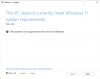
With Windows 11 running on my Intel iMac 18,3 (2017 27-inch) with Parallels for more than a year, I have only just noticed an alert "System requirements not met. Go to settings to learn more." There one reads "This PC doesn't meet system requirements for running Windows 11 [...] Installing Windows 11 on this PC is not recommended and may result in compatibility issues. If you proceed with installing Windows 11, your PC will no longer be supported and won't be entitled to receive updates." In fact, I have always received daily updates for Windows Defender, Cumulative Updates once or twice a month, and
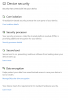
2023-01 Update for Windows 11 for ×64-based Systems (KB4023057) on the 24th January. Checking Privacy and Security in Windows shows everything (TPM and Safe Boot) and to be in place with green ticks. Do I need to pay much attention to this alert? It does not appear on my M1 Mac. Is there a way of making it go away?
2023-01 Update for Windows 11 for ×64-based Systems (KB4023057) on the 24th January. Checking Privacy and Security in Windows shows everything (TPM and Safe Boot) and to be in place with green ticks. Do I need to pay much attention to this alert? It does not appear on my M1 Mac. Is there a way of making it go away?