
jonathan_david
Hunter
i am having an issue transferring an XP boot camp install as a VM to a new machine.
i am following the:
How to transfer Boot Camp installation to your new Mac using Parallels Desktop for Mac - and -
Can I run my Boot Camp partition with Parallels Desktop - and -
Changing MAC address After Moving the Virtual Machine
so far i have run a CREATE VM from BOOT CAMP install on my 2006 mac pro.
taking it from the Parallels folder and putting it in the Parallels folder on the new machine.
then i clicked COPIED when i was prompted about the MAC address.
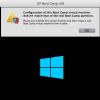
right now i have double clicked on the pvm file and it is hung up in a "Trying to Boot from Primary Master IDE drive". in the past i was getting the attached errors which as you can see have the WINDOWS 8 icon showing whereas i am trying to boot into a XP virtual machine. in order to try and solve this issue i /removed/ the drive with the native Boot Camp install of Windows 8 from the 2012 mac pro.
also, i have tried the new VM of the boot camp XP install on my 2006 machine and it does in fact start as a VM on the old machine (of course the original boot camp install is still on the 2006 machine).
finally, i am seeing the size of the pvm as being 272 MB whereas my windows 7 VM is 60 GB.
am i missing a step on the old machine where i have to create an INDEPENDENT and UNLINKED VM and right now i am somehow trying to create a linked VM on the old machine which is why this is not working?
THANKS for any help.
then i /copied/ the pvm file to the 2012 mac pro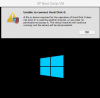
i am following the:
How to transfer Boot Camp installation to your new Mac using Parallels Desktop for Mac - and -
Can I run my Boot Camp partition with Parallels Desktop - and -
Changing MAC address After Moving the Virtual Machine
so far i have run a CREATE VM from BOOT CAMP install on my 2006 mac pro.
taking it from the Parallels folder and putting it in the Parallels folder on the new machine.
then i clicked COPIED when i was prompted about the MAC address.
right now i have double clicked on the pvm file and it is hung up in a "Trying to Boot from Primary Master IDE drive". in the past i was getting the attached errors which as you can see have the WINDOWS 8 icon showing whereas i am trying to boot into a XP virtual machine. in order to try and solve this issue i /removed/ the drive with the native Boot Camp install of Windows 8 from the 2012 mac pro.
also, i have tried the new VM of the boot camp XP install on my 2006 machine and it does in fact start as a VM on the old machine (of course the original boot camp install is still on the 2006 machine).
finally, i am seeing the size of the pvm as being 272 MB whereas my windows 7 VM is 60 GB.
am i missing a step on the old machine where i have to create an INDEPENDENT and UNLINKED VM and right now i am somehow trying to create a linked VM on the old machine which is why this is not working?
THANKS for any help.
then i /copied/ the pvm file to the 2012 mac pro
