Triple Boot Bootcamp & Parallels working for Windows but not Linux.

sck_nogas

Junior Member
New Parallel user here...

I have a triple bootcamp system following the instructions from OnMac.net's Wiki and also have a working Custom BootCamp Image for the Windows partition (disk0s4) running on the new Parallels Desktop for Mac build 3170 RC3

But, what I can't get working is the Linux partition (disk0s3) to work via Parallels Desktop. I have a working Fedora Core 6 install via BootCamp and can select it via rEFIt to let me boot any of the three OS's. So, I know the OS and partition are good. Here is the pvs for my Linux side...
Code:
[System]
Boot = c
Parallels VM Name = Fedora Core 6
VM Id = {f63d3798-cc64-4e08-a1c2-bbb92feb8fef}
VM Description = 
OS Type = 151
Memory = 512
Video Memory = 16
Memory block size = 10
Acceleration level = 2
Enable write-back disk cache = 1
VT-x support = 1
Start auto = 0
AutoShutdown = 0
Start full screen = 21
Start dashmode = 0
Start full screen warning = 1
PC Speaker enable = 1
Window Mode = 1
Multi frame = -1
Guest Tools Status = -1
[Shared folders]
Shared folders enabled = 1
Sharing enabled = 0
Shared folders count = 0
[Video]
Video resolutions enabled = 1
Video resolutions count = 0
[Coherence]
Show taskbar = 1
Relocate taskbar = 0
Exclude Dock = 1
Multiple displays = 0
[IDE devices]
Disk 0:0 enabled = 1
Disk 0:0 = 1
Disk 0:0 media = 1
Disk 0:0 connected = 1
Disk 0:0 image = Boot Camp;disk0s3
Disk 0:0 cylinders = 65016
Disk 0:0 heads = 16
Disk 0:0 sectors = 63
Disk 0:1 enabled = 1
Disk 0:1 = 2
Disk 0:1 media = 1
Disk 0:1 connected = 1
Disk 0:1 image = Default CD/DVD-ROM
Disk 1:0 enabled = 0
Disk 1:0 = 0
Disk 1:1 enabled = 0
Disk 1:1 = 0
[Floppy disks]
Floppy 0 enabled = 0
Floppy 0 = 1
[Serial ports]
COM1 enabled = 0
COM1 = 0
COM2 enabled = 0
COM2 = 0
COM3 enabled = 0
COM3 = 0
COM4 enabled = 0
COM4 = 0
[Parallel ports]
LPT1 enabled = 0
LPT1 = 0
LPT2 enabled = 0
LPT2 = 0
LPT3 enabled = 0
LPT3 = 0
[Sound]
Sound enabled = 1
Sound = 1
Sound connected = 1
Sound device = Default Audio
Mixer device = Default Audio
[Network]
Network enabled = 1
Network = 3
Network connected = 1
Adapter No = 0
Adapter name = Default Adapter
Adapter type = 4
Port = 0x00000300
IRQ = 3
MAC address = 005a63ba2825
Network2 enabled = 0
Network2 = 0
Network3 enabled = 0
Network3 = 0
Network4 enabled = 0
Network4 = 0
Network5 enabled = 0
Network5 = 0
[Usb]
USB enabled = 1
USB = 1
USB autoconnect = 0

Any ideas?

Scott
 
i dont believe parallels has ever supported booting linux via bootcamp. someone feel free to correct me if i'm wrong..
 
I sent this into Parallels Support via the webform on Thu Feb 22 @ 13:21:47 2007
As documented in this thread on the forum http://forum.parallels.com/showthread.php?p=46177

I have a Custom BootCamp image with 3 bootable OSs, Mac-OX, Fedora Core 6 Linux, and Windows XP.

I have a working rEFIt system with all three systems able to boot natively. However, only the Windows BootCamp partition can run under Parallels. Is this possible to do? If not, what can I do to help add this support for future releases?

So, we'll see what they say...
 
Got this respone back from them on 2/24/07 6:25 AM,
Hello, Scott!

No wonder as Boot Camp enables Intel-based Macs to run Microsoft Windows XP, Service Pack 2, Home or Professional (No multi-disc, upgrade or Media Center versions) only.

Not the helpful response I was hoping for. So, yesterday 2/24 at 6:36am, I sent back
BootCamp will function in a multi-boot (three OS mode). I have it currently working following the step at http://wiki.onmac.net/index.php/Triple_Boot_via_BootCamp

What doesn't work is Parallels Desktop being able to boot off the middle (linux) partition.

So, to restate my issue.

1) I have 3 separate Operating Systems installed on my MacBook Pro.
1. Mac OS-X 10.4 - /dev/disk0s2
2. Fedora Core 6 - /dev/disk0s3
3. Windows XP SP2 - /dev/disk0s4

2) All three Operating Systems are accessible and fully functional when running natively.

3) I have Parallels Desktop Build 1970 for Mac installed and working for the Windows XP SP2 image.

4) I DO NOT have a working configuration to allow Parallels to boot the Fedora Core 6 Linux installation installed in /dev/disk0s3

I have documented my configuration file (pvs) in this thread http://forum.parallels.com/showthread.php?p=46177 in the Parallels support forum.

What do I need to do to be able to boot this partition via Parallels? If this is not currently possible, then what can I do to help add this support for future releases?

Scott

Let's see what they say to this.
 
With Build 3186, I managed to go from not being able to boot at all, to being able to load grub. But I too get the warning "You are trying to boot via virtual machine into the Boot Camp partition with operating system that is not supported by Parallels Desktop...blah, blah, blah" and I select cancel an then get dumped into grub...

But, it can't seem to find the disk to boot from. So, I'll be trying to figure out the grub.conf details to let me boot... :)

Scott
 
By the way, I got some more "incredibly useful" tech support back from my email..
On 2/26/07 3:49 AM, "XXXX via RT" <desktop@parallels.com> wrote:
Hello, Scott!

Read please http://www.apple.com/macosx/bootcamp/
It is official apple point of view.

Best regards,

To which I replied (but also sent it to beta@parallels...)
XXX,

I thank you for the pointer to the Apple Bootcamp web page. I am well aware of Apple's choice of operating system that they support.

Please contact your development team and let them know that there is a problem in booting non-Windows OS when installed to a local physical drive.

As documented in these threads, this is a requested feature.

Boot Linux in Parallels
http://forum.parallels.com/showthread.php?p=42325

Triple Boot Bootcamp & Parallels working for Windows but not Linux.
http://forum.parallels.com/showthread.php?t=9104

Triple boot; use Parallels with XP partition
http://forum.parallels.com/showthread.php?t=6379

If they have any questions they can contact me directly.

Scott

So basically, the responses I got from tech support were incredibly useless. I can't seem to get it through their heads that I WANT to help them be able to do this, and if I can work with them to do it, then great.

So, it's off to do it myself. :mad:

Scott
 
I had the same problem. In my case, and maybe in yours too, is that when you install linux in bootcamp it will detect the hard disk partion as /dev/sda2 or /dev/sda3 which is what its supposed to do with a sata drive. when you boot in parallel, that's sees as a hda2/hda3, so it's ide.
All you need to do is add an entry in your grub configuration file for parallels (copy the existing one and change sda<X> into hda<X>.

Good luck.
Alessandro
P.S.
Of course, you will have more trouble after you suffesfully boot, when the Xorg driver will die on the emulated vesa, but then all you need to do is change the driver to vesa (and swap xorg.conf files from parallels to bootcamp, if you want the zippy native graphics when you boot on bare metal)
 
alessandrobo.... Not sure what you meant when you said...
All you need to do is add an entry in your grub configuration file for parallels (copy the existing one and change sda<X> into hda<X>.
Since grub itself is device independant, but you got me thinking and googling and what I found in Linux, Boot Camp, Parallels was this nugget...
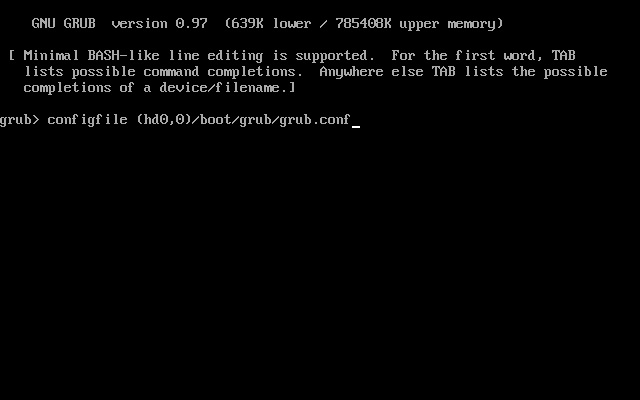
Enter Parallels: when you boot your Boot Camp virtual machine, Parallels hides the first two partitions to prevent data loss2. The whole disk now appears to contain one single partition, and your (hd0,2) becomes (hd0,0). Now GRUB, of course, is configured to look for (hd0,2), and while it’s a very flexible boot loader, this is a little bit too much for it to handle.

So, from that URL I pointed the path to the "correct" grub.conf.
finding_boot.conf.jpg


But, then I needed to "tweak" my grub.conf to point to the right device. So, I did this to make a more flexible grub.conf for Parallels and for BootCamp boots...
Code:
# grub.conf generated by anaconda
#
# Note that you do not have to rerun grub after making changes to this file
# NOTICE:  You do not have a /boot partition.  This means that
#          all kernel and initrd paths are relative to /, eg.
#          root (hd0,2)
#          kernel /boot/vmlinuz-version ro root=/dev/sda3
#          initrd /boot/initrd-version.img
#boot=/dev/sda3
default saved
fallback 1
timeout=5
splashimage=(hd0,2)/boot/grub/splash.xpm.gz
hiddenmenu
title Fedora Core (2.6.19-1.2911.fc6)
        root (hd0,2)
        kernel /boot/vmlinuz-2.6.19-1.2911.fc6 ro root=LABEL=/ rhgb quiet
        initrd /boot/initrd-2.6.19-1.2911.fc6.img
        savedefault fallback
title Fedora Core (2.6.19-1.2911.fc6) Parallels
        root (hd0,0)
        kernel /boot/vmlinuz-2.6.19-1.2911.fc6 ro root=LABEL=/ rhgb quiet
        initrd /boot/initrd-2.6.19-1.2911.fc6.img
        savedefault fallback

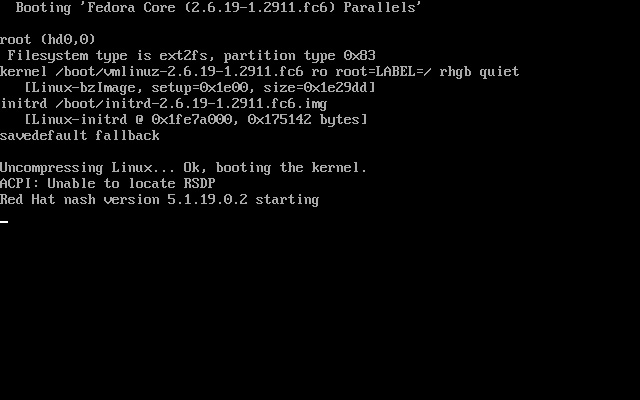
After now the system finds the right config file, and the right disk partition, and the kernel should boot.
Boot_start.jpg


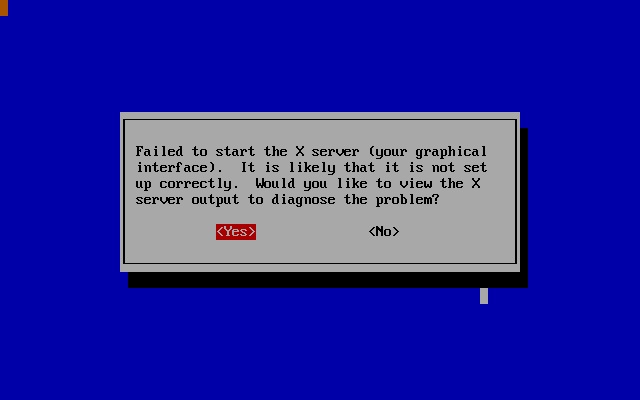
But now, X won't work yet, since my /etc/X11/xorg.conf is not using the 'vesa' driver, but is using the 'fglrx' driver, so I skip through these steps, and leave my X config along.
X-Failure.jpg


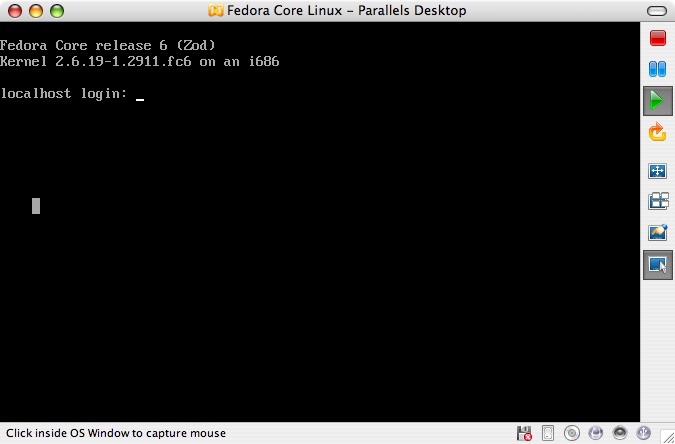
Finally login is shown, and I can login and continue working on this...
login.jpg


But, there's more work to be done.
  1. Find a way to have the correct grub.conf file location be flexible between BootCamp & Parallels
  2. Find a flexible way to have the right xorg.conf be chosen between the native driver and the Parallels driver
  3. Get rid of the annoying, you're booting a non-Windows BootCamp warning from Parallels.
  4. Find a solution to the 512 MB RAM limit for Fedora Core 6.

Scott
 
identifying unique xorg.conf / other files

Hi all,

I've been messing about with triple booting my macbook pro for a while and finally have everything almost working... just a few tweaks here and there to do...

Anyway... I got my MacBook Pro to boot OS X, Windows XP, and Slackware 11.

I did the install using Lilo as the boot loader. I used the MBR of /dev/sda3 (the slackware partition) this was important as otherwise the efi partition breaks in an unfixable manner....
and I copy that MBR to a file and point the Windows Boot Loader at it...


Ok, so the way that I get parallels to boot my linux is using a floppy image with lilo installed onto it... (i did this using a generic slackware kernel disk (sata.i) and pointed the root to /dev/hda1 then created the relavant lilo.conf....

Anyway, I can go into more detail if people want...

The interesting part is that you can use the boot process to identify if you are native or parallels, by detecting hardware differences...

With Slackware you have an initialisation script /etc/rc.d/rc.S

this is the Single user script...
Code:
------ snip -------

# Mount /proc right away:
/sbin/mount -v proc /proc -n -t proc

# this is near the top of the file I have added the following lines after the /proc 
#is mounted

# I know that in native mode I don't have a HDB I only have HDA and SDA you may need to 
#tweak this for other systems... I only have a MBP so this is how I distinguish between 
#modes... other ways may be detecting number of processors, grapics card, 
#ethernet adapter etc..

if [ -x /proc/ide/hdb ]; then[INDENT]
   # first off we need to be able to edit files....
   mount /dev/hda1 / -o rw,remount
   # perform file changes here like examples below...
   cp /etc/fstab.parallels /etc/fstab
   cp /etc/lilo.conf.parallels /etc/lilo.conf
   # just to let you know where you are, useful for debugging....
   echo *************PARALLELS CONFIGURATION**************
   mount /dev/hda1 / -o ro,remount
   # it is important to remount as read only or you get diskcheck problems later[/INDENT]
else[INDENT]
   mount /dev/sda3 / -o rw,remount
   cp /etc/fstab.native /etc/fstab
   cp /etc/lilo.conf.native /etc/lilo.conf
   echo *************NATIVE CONFIGURATION****************
   mount /dev/sda3 / -o ro,remount[/INDENT]
fi

------ snip -------

I hope this is helpful to someone out there....
 
Last edited:
Extensive support of OpenGl for 3D acceleration in Linux

I installed Suse 10.1 in Parallel (not natively). I couldn't get 3D enabled. I have natively installed Suse 10.1 too with 3D acceleration enabled. An attempt to run through bootcamp will help? Any hint?
 
Well, to update...

I've still not been able to successfully boot my Linux Bootcamp partition after Apple replaced my 160GB drive ( formatted 100GB Mac, 15GB Linux, 40GB Windows) with a 200GB drive (formated 131GB Mac, 15GB Linux, 40GB Windows). I was having issues with Parallels booting my Windows Bootcamp until I got this suggestion.

On 4/24/07 9:45 AM, "James Romanov via RT" <support@parallels.com> wrote:
> Hello, Scott.
> Thank you for contacting Parallels support.
> Let me apologize for this inconvenience in e-mail support. We have the
> same problem with Windows XP and Vista in Bootcamp and we are
> investigating this problems.
> Please try to use
> Disk 0:0 image = Boot Camp;disk0s4;disk0s3
> Please send me the results of your attempt.
> Thank you in advance.
> Best regards
> James

This worked, but I still don't understand why it worked. Since the solution they gave me was to add the Linux Bootcamp partition as a second entry in the Windows Partition statement for Parallels? I wonder if it's because that partition is just on the other side of the 132 GB boundary? But, Linux itself doesn't boot.

I have since upgraded to Parallels Desktop 3.0 and Bootcamp 1.3 and Windows XP is still happy, though I can't boot my Linux partition at all.

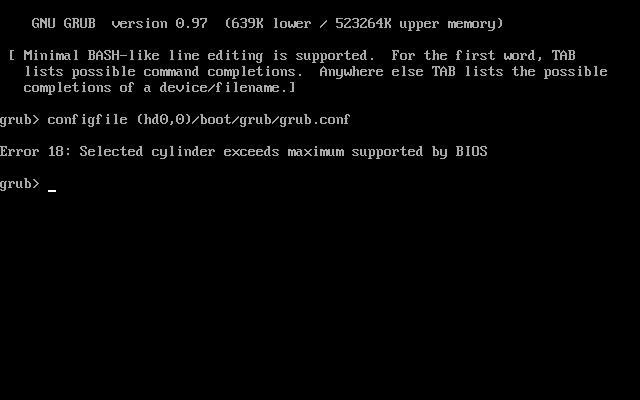
On the old 160GB drive, I could at least get Linux booting if I manually tweaked GRUB, but now on the 200GB drive, I just get..
Linux_failed_boot.jpg

So, my ideas have been...

1) Create a GRUB floppy image (same error)
2) Use a different Boot Loader (like GAG) But it can't see the partitions
3) Use an ISO image of the RescueCD, which can mount the partition.

Anyone got any other ideas?

Scott
 
Back
Top