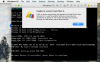
I cannot start the Windows 10. I get an error message stating "Unable to connect Hard Disk 0:
A file or device required for the operation of Hard Disk 0 does not exist or is used by another process, or you have no permission to access it. The virtual machine will continue running, but the device will be disconnected." I click on OK and get a terminal-style window that says "no boot device is available, press enter to continue."
Last night I restored everything on my Mac via Time Machine. This morning I updated to the newest version of Parallels Desktop. I do not know if one or the other process caused the problem.
The Windows 10.pvm file appears to have been corrupted since it has only about 35 MB and it normally has GB.
After reading how others have resolved similar problems, I tried restoring the Window 10.pvm file from yesterday. However, that did not resolve the problem. I would very much appreciate advice on how to resolve this problem. Thanks in advance for your time and help. I am attaching a screen shot.
A file or device required for the operation of Hard Disk 0 does not exist or is used by another process, or you have no permission to access it. The virtual machine will continue running, but the device will be disconnected." I click on OK and get a terminal-style window that says "no boot device is available, press enter to continue."
Last night I restored everything on my Mac via Time Machine. This morning I updated to the newest version of Parallels Desktop. I do not know if one or the other process caused the problem.
The Windows 10.pvm file appears to have been corrupted since it has only about 35 MB and it normally has GB.
After reading how others have resolved similar problems, I tried restoring the Window 10.pvm file from yesterday. However, that did not resolve the problem. I would very much appreciate advice on how to resolve this problem. Thanks in advance for your time and help. I am attaching a screen shot.