Upgraded to 12, get "Unable to connect to Mac '%1'" message

BenP2

Bit poster
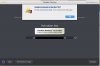
I just upgraded from 11 to 12 (Parallels Desktop), my activation key was accepted (green checkmark next to upgrade key), but pressing "Activate" button results in the message: " Unable to connect to the Mac "%1" " with the sub-message: "The SSL authentication failed. Try to connect to this Mac again." Subsequent tries result in same message. Help please?

Ben
 
I am having the same issue and my Mac is connected to the network. What other options do I have to fix this?
 
Attached is the error message I am receiving and I am connected to the network on my Mac
 

Attachments

  • 2016-10-05 03.29.45 pm.png
    2016-10-05 03.29.45 pm.png
    86 KB · Views: 40
Attached is the error message I am receiving and I am connected to the network on my Mac
Hi, check if there is any Antivirus installed on Mac OS X if so then try to disable it during the activation process and also check if there is any proxy enabled on your Mac network by following the steps from the article and let us know if that makes any changes.
 
I ma upgrading to 12 from 11 and the upgrade is hanging ...Verifying "ParallelsDesktop-12.0.2-41353"... It has stuck there for ages. What can be wrong?
 
Attached is the error message I am receiving and I am connected to the network on my Mac
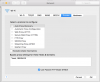
I do not have an antivirus running and the picture shows what it says in the Proxy. Do I need to remove the one in the list?
 

Attachments

  • 2016-10-07 03.26.27 pm.png
    2016-10-07 03.26.27 pm.png
    169 KB · Views: 49
Hello I have the same problem. I am under Sierra 10.12.2 and I have tried to install Parallels Desktop Business 12.1.1-41491 without success. I have the following message: "unable to connect the Mac" 1. I have the same thing by disabling the antivirus and changing network . This version of Paralles Dekstop is compatible with the latest version of Sierra?
Waiting for your reply. Thank you
 
Hello I have the same problem. I am under Sierra 10.12.2 and I have tried to install Parallels Desktop Business 12.1.1-41491 without success. I have the following message: "unable to connect the Mac" 1. I have the same thing by disabling the antivirus and changing network . This version of Paralles Dekstop is compatible with the latest version of Sierra?
Waiting for your reply. Thank you
Hello DenisC3, did you check the internet connectivity on Mac side? Parallels Desktop Business version 12.1.1- 41491 is compatible with Mac OS X Sierra.
 
Hello Paul, I do not have a network problem. everything is working. I do not see where she's the problem. an idea?
 
Back
Top