"USB Device Cannot be Connected"

SimonB17

Junior Member
When using Parallels I get endless continuous popups for Printers that are in my laptop's history which I am not trying to use.
Every popup says:

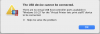
The USB Device Cannot be connected
There are no virtual USB host controller ports available

This is cycling through every printer in the list (there are about 40!). I once went through and removed all devices from the list, but when I logged in the next day they were all there again.

How can I stop this? I only use Parallels for Steam (and playing Windows games through my Macbook) but this makes things pretty unplayable.

Any advice appreciated!
Thanks
 
When using Parallels I get endless continuous popups for Printers that are in my laptop's history which I am not trying to use.
Every popup says:
The USB Device Cannot be connected
There are no virtual USB host controller ports available
This is cycling through every printer in the list (there are about 40!). I once went through and removed all devices from the list, but when I logged in the next day they were all there again.
How can I stop this? I only use Parallels for Steam (and playing Windows games through my Macbook) but this makes things pretty unplayable.
Any advice appreciated!
Thanks
Hello,
could you collect the tech report once the issue reproduced please and post the report's ID here.
We will investigate this issue with the Parallels Engineering Team.
Looking forward to your reply.
 
How may printers did you connect to your VM?
Could you please remove from your mac (System Prefernces -> Printers & Scanners) not using printers (if any) and check the issue.
 
How may printers did you connect to your VM?
Could you please remove from your mac (System Prefernces -> Printers & Scanners) not using printers (if any) and check the issue.

Hi Maria. 90 Printers show in the settings, I haven't connected any printers to the VM but I recognise a lot of these as ones I have used over the past 3-4 years with my macbook. Is there a way of disconnecting permanently? As per my initial post - I once spent a long time removing all 90 but they re-added themselves without any promoting.
 
Hi @Maria@Parallels

I removed all printers from the list and then when the popups appeared again recorded the technical data. Report ID - 357931111
When will someone be able to look at this for me and give me any help with preventing this from happening?
 
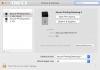
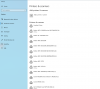
Hi @Maria@Parallels - i've taken screenshots of both menus. Can you let me know what you'd like to see in more detail?
As you can see there are two in my macbook settings and you can start to see the long list of others in the parallels window. Screenshot 2021-01-22 at 08.03.19.png Screenshot 2021-01-22 at 08.04.42.png
 
Back
Top