Greetings,
I have a 2022 Mac Studio with an M1 Max chip and macOs Ventura 13.2.1.
I've installed Parallels Desktop 18 for Mac, Pro Edition (Version 18.2.0)
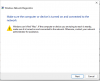
I get an error first starting Windows 11, launching File explorer, and other actions, saying it can't access "\\Mac\Home\Desktop" (documents, downloads also show this error). Hitting the Diagnose problem, I see this attached message.
I've reinstalled Parallels Tools as suggested in other (older) posts.
Any suggestions?
I have a 2022 Mac Studio with an M1 Max chip and macOs Ventura 13.2.1.
I've installed Parallels Desktop 18 for Mac, Pro Edition (Version 18.2.0)
I get an error first starting Windows 11, launching File explorer, and other actions, saying it can't access "\\Mac\Home\Desktop" (documents, downloads also show this error). Hitting the Diagnose problem, I see this attached message.
I've reinstalled Parallels Tools as suggested in other (older) posts.
Any suggestions?