
Install the app
How to install the app on iOS
Follow along with the video below to see how to install our site as a web app on your home screen.
Note: This feature may not be available in some browsers.
You are using an out of date browser. It may not display this or other websites correctly.
You should upgrade or use an alternative browser.
You should upgrade or use an alternative browser.
Windows 10 fails to boot
- Thread starter DavidB27
- Start date

DustinHullett
Product Expert
try going to your VM configuration settings and changing the hypervisor setting to Apple hypervisor instead of parallels then startup the VM.
You have to shutdown before you can change this setting.
right click the VM in control center > click configure > hardware tab > CPU and Memory > Advanced settings > Hypervisor > Change to apple
Startup Vm and see if the problem goes away. If it does you can try changing the setting back after you have successfully booted the VM
You have to shutdown before you can change this setting.
right click the VM in control center > click configure > hardware tab > CPU and Memory > Advanced settings > Hypervisor > Change to apple
Startup Vm and see if the problem goes away. If it does you can try changing the setting back after you have successfully booted the VM
Been using Parallels 11 pro and Windows 10 iMac27"5k for a few months then upgraded to Parallels 12. VM has failed to boot. It just tries, fails then restarts. Anyone else had this issue and any resolution?
This happened on two iMac. Who can help pls !!!!.
tandura@mac.com
This happened on two iMac. Who can help pls !!!!.
tandura@mac.com

Maria@Parallels
Problem solver
Please check the VM file size (.pvm file)? Is it too small or it's ok?Been using Parallels 11 pro and Windows 10 iMac27"5k for a few months then upgraded to Parallels 12. VM has failed to boot. It just tries, fails then restarts. Anyone else had this issue and any resolution?
This happened on two iMac. Who can help pls !!!!.
tandura@mac.com
Also do you have any error message while you're booting your Windows? (for ex: no operation system installed)
Tried amending the hypervisor but still the same unfortunately. VM just keeps going to the select boot device screen then fails to start and repeats. Thanks for the info though - it was worth a go.try going to your VM configuration settings and changing the hypervisor setting to Apple hypervisor instead of parallels then startup the VM.
You have to shutdown before you can change this setting.
right click the VM in control center > click configure > hardware tab > CPU and Memory > Advanced settings > Hypervisor > Change to apple
Startup Vm and see if the problem goes away. If it does you can try changing the setting back after you have successfully booted the VM
Also checked the size of the .pvm file. Its 180GB at the moment which looks fine
Been using Parallels 11 pro and Windows 10 iMac27"5k for a few months then upgraded to Parallels 12. VM has failed to boot. It just tries, fails then restarts. Anyone else had this issue and any resolution?
This happened on two iMac. Who can help pls !!!!.
tandura@mac.com
Share us the screenshot of BSOD or any other errors to check and assist.
I have the same issue. When I start Parallels, Windows starts automatically, after 30 seconds, I have a black screen and I can't move the mouse.
It is not possible to change the hypervisor setting and it isn't also possible to stop windows starting.
Also can not change something in the control center.
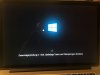
Attached the screenshots
Thanks
It is not possible to change the hypervisor setting and it isn't also possible to stop windows starting.
Also can not change something in the control center.
Attached the screenshots
Thanks
Attachments

P
Pradeep@Parallels
Hello RalphH2, looks like it might be due to Windows update.I have the same issue. When I start Parallels, Windows starts automatically, after 30 seconds, I have a black screen and I can't move the mouse.
It is not possible to change the hypervisor setting and it isn't also possible to stop windows starting.
Also can not change something in the control center.
Attached the screenshots
Thanks
may I know how long it been stuck on the same screen?
P
Pradeep@Parallels
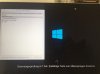
Please select Actions(on Apple menu bar) > Reset and check if that makes any changes.It been stuck on the same screen for hours after that the screen is all black.
I think also that is since a Windows update. What can I do? How can I delete and install Windows 10 again? I'm not an Expert in this. Can you explain the steps or can you help me?
Thanks
FranciscoJ3
Bit poster
Hello, I have the same problem!!!I have the same issue. When I start Parallels, Windows starts automatically, after 30 seconds, I have a black screen and I can't move the mouse.
It is not possible to change the hypervisor setting and it isn't also possible to stop windows starting.
Also can not change something in the control center.
Attached the screenshots
Thanks
Javier A.
Maria@Parallels
Problem solver
Did you try to reset your VM?Hello, I have the same problem!!!
Javier A.
Maria@Parallels
Problem solver
You can reset (Actions -> reset ) your Window VM om any stage.It is not possible to reset the VM because Windows starts after I started Parallels and I can not stop Windows to start
Also in VM configuration you can choose Option tab-> then Startup and shutdown and then- > never for the "Start automatically" option
Dear Maria,
Sorry, but I don't know how to do that. Where can I find the VM configuration and where can I find Actions in the German OX? Is it in the Parallels Desktop settings?
When I start Paralles Desktop Windows starts immediately and after 10 seconds the complete system is down. So I can not shutdown Windows.
Sorry, but I don't know how to do that. Where can I find the VM configuration and where can I find Actions in the German OX? Is it in the Parallels Desktop settings?
When I start Paralles Desktop Windows starts immediately and after 10 seconds the complete system is down. So I can not shutdown Windows.
P
Pradeep@Parallels
Hello RalphH2, this article will tell you how to access your virtual machine's configuration.Dear Maria,
Sorry, but I don't know how to do that. Where can I find the VM configuration and where can I find Actions in the German OX? Is it in the Parallels Desktop settings?
When I start Paralles Desktop Windows starts immediately and after 10 seconds the complete system is down. So I can not shutdown Windows.
FranciscoJ3
Bit poster
Hello, I have reseted de VM, and all the same.
FranciscoJ3
Bit poster
Did you try to reset your VM?
Hello, I have reseted de VM, and all the same. The Windows recovery installation to previous version window appear over and over again