AutoCAD on Parallels

archibrat said:
I am an architect and have been using both with XP running on a 17" MB Pro with 2 gigs ram with great results. It seems to handle the 3D models fine, renders in about the same speed as my 2yr old Dell Pent. 4 desktop; (about 3 - 30 seconds slower given the rendering options). There is a very slight lag in the mouse tracking, but most people do not notice this issue. My wife's low end Dell laptop has the same issue. There is a problem with the middle button of a 3 button mouse. It does not work to PAN as it does running traditionally. This is a big pain for me. I use my middle button to PAN and having to type in P + enter each time I do so is annoying. This is a Parallels issue with 3 button mice drivers.. They do not allow you to modify the middle button; or program it. Hopefully this will get fixed. I think there is another way around this if you can find someone who can program AutoCAD's mouse input commands.

I was also having the same problem with the middle button not panning, but got it working yesterday. Go to mac System Preferences, then Keyboard/Mouse settings and change the middle button to BUTTON 3. When you go back to Autocad it should now work the way you want it
 
Using Revit

bomberaia said:
No one uses Revit?

Heya Bomber. :) PhilR here. Yep - using Revit extensively. Mac Book Pro w/ 2gb ram. One gig is allocated to Parallels. Speed is quite sufficent at lesser resolutions than full screen mode (which is not so much of an issue on 17" screen. Looking forward to MBP with possible 4gb ram.
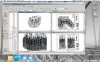
One ongoing annoyance: the temporary dimension are **very tiny**. A new user probably wouldn't even see them. An experienced user would find having to carefully select them annoying. But maybe less annoying than having to reboot into Boot Camp.

I only reboot for large/demanding datasets. So reboot for >100mb files (WTC).

I'd suggest you set up a Boot Camp partition and then access it from Parallels. This will allow you the option of Booting into XP alone if you need a dedicated OS.

Something very interesting (and appreciated): rendering in Revit (via Parallels) means that you don't lock up your OS when you push the render button. You can actually drag/hide/minimize the Revit window in real-time while rendering. So once I start a render - I hide the view and work in OS X as if nothing is happening. OS X continues to work. I don't run full screen - so hiding Revit during rendering is trivial.

Also - running latest beta build with no issues. Coherence is nice feature. Revit icon sits in OS X dock now. :)

So overall - not as fast as XP alone. But quite sufficent. If the temp dimensions were resolved I could do training via Parallels. Actually submitted this issue to Parallels but have not heard back (yet).

Attached image is of 80mb project. Trying to rotate the whole project with everything open is pokey but still acceptable. Expect to Open/Close worksets selectively and create shortcuts for Hide/Isolate/Reset helps. Basically the stuff you do to work smart anyway. Otherwise - opening/creating new views is fine. Rendering 1800x2000 image took <3 minutes.

Maybe a thread in the AUGI forum for Revit<>OSX/MacIntel Hardware would be helpful as well.

And looking forward to MBP's with 4gb ram...so I can allocate more memory to Revit.

All the best -

Phil
 

Attachments

  • Picture 1.jpg
    Picture 1.jpg
    430 KB · Views: 39
flak said:
I'm using paralles on my Macbook Pro and a bluethoot logitec mouse... the middle button works just like in a pc. (latest build of paralles and acad 2006)

For the cursor issue... there is a work around: in windows go to the display properties, select the settings tab and press the advanced button... once on the new window select the troubleshoot tab, then look for the hardware acceleration control and select one less than full. This fixes the cursor issue... I been doing great since I discovered thar... good luck.


flack - after all the years I've used Windows I'm not sure why I never thought of that! very good tip to getting rid of the double cursor...


I run an original MacBook (Core Duo not Core 2 Duo) with 2GB ram and 256MB assigned to Parallels with no issues. I do mostly 2D drafting with some 3D solids from time to time and it runs as good as the Dell Inspiron 600 it replaced, for what I need it to do. I work in construction and I have no problems opening and modifying large AutoCAD files from architects and engineers.

I mainly use Parallels for AutoCAD and Internet Explorer to access my company's Exchange webmail, since using anything else limits the webmail's features. But the speed of Parallels is completely adequate, even when I have the MacBook plugged into a 2nd display running at 1600x1200 resolution.
 
chell said:
I have yet to buy my new Mac......should I buy extra RAM in order to run the program smoothly?
Yes--essentially each operating system will see half your RAM--so if you want Windows and OSX to have a gig each, I'd say 2 gig is the minimum.

PJK
 
Inventor 10

Have Beta Build 3106 and have no regrets. Would highly recommend Parallels to anyone wishing to run Autodesk
 
Yep, been using Revit 9.0 and 9.1 a lot in Parallels. The temp dimension bug is the only thing that's annoying. Everything else is just peachy.

It's so nice to have a rest of Mac OS X available for use while working in Revit!

Angelo
 
AutoCAD LT on Parallels

I just started using Parallels today for the first time. I'm an old-time Mac user and have, for years, been looking for a way to run AutoCAD. It did run, sort of, with Virtual PC, but it was very slow. So, I eventually bought a Windoze PC just to run AutoCAD.

Today I downloaded the latest Parallels (Build 3150), and used Transporter to convert my Virtual PC virtual machine for Parallels. The process was very straightforward, and took about 30 minutes. My VPC machine is about 10 GB, so that's not too bad. (The conversion took 2 steps: first convert the VPC machine while running in VPC on a pre-Intel Mac, transfering this to my Mac Pro, and then convert again on the Mac Pro.)

The very first thing I did was fire up AutoCAD LT 2007. The OS is Windoze XP.

Amazing. It is very fast and my years of looking for a workable Mac/AutoCAD solution are over.

This a absolutely perfect for my needs. I am a consultant, so I am not creating drawings, but I do a lot of markups and overlays (add layers) to send back to architects and other design team members. And, I don't work in 3D. My work is in churches and performing arts centers (acoustics and audio) some with multiple buildings on one campus, and some of these projects (and the AutoCAD files) are hefty.

Also, remember that this particular verision and build of Parallels is a Beta: It's only going to get better.

My setup: Mac Pro Dual-Core Intel @ 2.66 GHz, 9GB Ram, Mac OS 10.4.8
 
angelo said:
Yep, been using Revit 9.0 and 9.1 a lot in Parallels. The temp dimension bug is the only thing that's annoying. Angelo

Well - seems the temp dimension bug is back in 3.0 (thru latest build).

Hope this gets fixed soon. As is with V3, using Revit is fairly untenable in Parallels.

Back to Boot Camp....:)

-Phil
 
Running AutoCAD LT 2008 - OK, mostly

I've been running AutoCAD LT on my MBP since January and it's been relatively smooth sailing. The new version of parallels is much better, but I noticed a problem this morning.

I updated to LT 2008 last month and just today started using it in coherence mode. I could not execute the XREF command to manage my external references. I would get a fatal error and AutoCAD would quit. I tried purging, auditing, etc..., but nothing helped, then I tried several other projects and got the same results. Problem with AutoCAD? No, it all worked fine when I went to fullscreen. I'll post on the Autodesk forum as well to see if this is an update that Autodesk can provide. Thankfully there's an easy work around.

Oh and by the way, you can never have too much RAM, especially in a notebook.
 
I'm having a similiar problem with Architectural Desktop 2006. If I launch ADT by double clicking on a dwg file which will launch parallels and then Autocad in coherence it will crash after a few seconds. However if I launch Autocad first in windowed mode and then open the file no problem. I can also switch to coherence and again no problem. It seems strange.

I tried your problem with xrefs but could not cause a fatal error.
 
Properties Crash

We have been using Autocad in Parallels 3.0 and every time we use the properties dialog box Autocad crashes. Has anyone else had this problem and did you resolve it??
 
chell said:
Are there any AutoCAD users out there that have tried parallels. Does it run well with such graphic intense programs??


I have found at leat two graphics / CAD programs using OpenGL that does not work with version 3, and which worked fine on older versions. When will we see an update?
 
Same here

abhayos said:
We have been using Autocad in Parallels 3.0 and every time we use the properties dialog box Autocad crashes. Has anyone else had this problem and did you resolve it??

Same issue here. Opening the properties dialog, xref dialog ... basically any of those "floating" dialogs results in an access violation and crash:

FATAL ERROR: Unhandled Access Violation Reading 0x0002 Exception at 2h

This only happens in Coherence mode, but is completely reproduceable. Full screen and OS window work fine. From the Autodesk crash report, I get the following info (which may be of use):

<OpenGLInfo Vendor="Parallels Inc. & ATI Technologies Inc." Renderer="ParallelS over ATI Radeon X1600 OpenGL Engine" Version="2.0 ATI-1.4.56" />
<GraphicsInfo InfoType="D3D9Config">
<![CDATA[ Driver: PrlVideo.dll
DriverVersion: 3.0.4128.0
Description: Parallels Video Driver
DeviceName: \\.\DISPLAY1
VendorId: 6840
DeviceId: 4401
SubSysId: 0
Revision: 0
WHQLLevel: 0
DeviceType: 0
AdapterOrdinal: 0
Caps: 0
Caps2: 0
Caps3: 0
Presentation: 0
Cursor: 0
Dev: 0
PrimitiveMisc: 0
Raster: 0
ZCmp: 0
SrcBlend: 0
DestBlend: 0
AlphaCmp: 0
Shade: 0
Texture: 0
TextureFilter: 0
CubeTextureFilter: 0
VolumeTextureFilter: 0
TextureAddress: 0
VolumeTextureAddress: 0
Line: 0
MaxTextureWidth: 0
MaxTextureHeight: 0
MaxVolumeExtent: 0
MaxTextureRepeat: 0
MaxTextureAspectRatio: 0
MaxAnisotropy: 0
MaxVertexW: 0
GuardBandLeft: 0
GuardBandTop: 0
GuardBandRight: 0
GuardBandBottom: 0
ExtentsAdjust: 0
Stencil: 0
FVF: 0
TextureOp: 0
MaxTextureBlendStages: 0
MaxSimultaneousTextures: 0
VertexProcessing: 0
MaxActiveLights: 0
MaxUserClipPlanes: 0
MaxVertexBlendMatrices: 0
MaxVertexBlendMatrixIndex: 0
MaxPointSize: 0
MaxPrimitiveCount: 0
MaxVertexIndex: 0
MaxStreams: 0
MaxStreamStride: 0
VertexShaderVersion: 0
MaxVertexShaderConst: 0
PixelShaderVersion: 0
PixelShader1xMaxValue: 0
Dev2: 0
MasterAdapterOrdinal: 0
AdapterOrdinalInGroup: 0
NumberOfAdaptersInGroup: 0
DeclTypes: 0
NumSimultaneousRTs: 0
StretchRectFilter: 0
VertexTextureFilter: 0
MaxVShaderInstructionsExecuted: 0
MaxPShaderInstructionsExecuted: 0
MaxVertexShader30InstructionSlots: 0
MaxPixelShader30InstructionSlots: 0

]]>
</GraphicsInfo>
 
AutoCAD 2008 - 3.0

I've read a few posts from ages ago but it seems still no fix for AutoCAD2008. I just unfortunately upgraded to 3.0 and my mouse is going crazy. Lack of all control from the mouse but the touchpad it's fine which sucks to draft with. I diasabled the synchronization and saw no improvement at all. Any other tips out there?
 
I know this won't help you, but I've just purchased one of the new Macbook Pro's and got Parallels 3.0. I have noticed very bizarre mouse behavior and very slow performance, but I'm using AutoCAD 2007.

I have Intel Core 2 Duo, 2.4 GHz, and 2 GB Ram.
 
I heard a juicy rumor that Rhino is working on a native Mac OS X version. That would be pretty sweet.
 
Back
Top