Clean upgrade. Problem: USB device not recognized
First the good news: the upgrade from 3 to 4.0 build 3540 went amazingly smooth all the way. It froze one or two times, but nothing that restarting the machine did not solve.
Even the Windows re-activation went great. I followed someone else' advice and instead of trying to get a new key over the Internet or even over the automated phone system, I went straight to a live person over the phone (clicked several times #0* until the system "gave up"), after a very short time talked to a nice rep who gave me the new key right away and from there, everything till the end went smooth.
Thank you Parallels!
I need Parallels and Windows mainly for backing up my Palm TX with the desktop, which is in a different league than the Palm desktop for Mac. I looked for a solution to this problem in this and other forums, but did not find any.
After upgrading Parallels and installing Kapersky (had to erase Zone Alarm Security Suite) I updated Windows XP, uninstalled completely (also from the registry) the Palm Desktop and installed it from scratch (the latest version on the Palm website- PalmDesktopWin414e).
Again, everything smoothly.
Now the only problem is that the moment I connect the handheld (it's not even on yet) to the USB port I get 2 error messages:
Parallels Desktop: "Stop the Palm synchronization and start it again.
Click Cancel on the Palm device's screen to stop the synchronization, then start it again. The device will be automatically connected to the virtual machine. Make sure you do not connect any other devices to your Mac when working with Palm." "OK"
AND
a Windows one: Found new hardware, your hardware is installed and ready to use (?!)
OR
"USB Device Not Recognized
One of the USB devices attached to this computer has malfunctioned and Windows does not recognize it. For assistance if solving this problem, click this message"
Of course that clicking on the message does not solve anything, I tried to troubleshoot with Windows help, no help.
Clicking on the message shows a pic of the USB Root Hub (2 ports) and under it one USB icon and next to it "Unknown Device" in bold letters (right clicking/Properties says "Device Status: No drivers are installed for this device") and underneath, one yellow question mark next to it written "Palm Handheld" (Properties: "This device is working properly") (?!) and "Driver/Driver Details: C:\Windows\PalmDevC.dll and C:\Windows\System32\Drivers\PalmUSBD.sys")
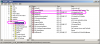
Going immediately to the Device Manager under "Universal Serial Bus Controllers":
1- "Intel (R) 82801FB/FBM USB Universal Host Controller- 2658- Ge- neral tab: This device is working properly."
2- "Intel (R) 82801FB/FBM USB2 Enhanced Host Controller- 265c- General tab: This device is working properly."
3- "Unknown Device, General tab: No drivers are installed for this device" (This one appears only I connect the handheld to the USB port)
4- "USB Root Hub, : This device is working properly." Properties/Driver/Driver Details: C:\Windows\System32\Drivers\usbd.sys and C:\Windows\System32\Drivers\usbhub.sys
5- "USB Root Hub, : This device is working properly." Properties/Driver/Driver Details: C:\Windows\System32\Drivers\usbd.sys and C:\Windows\System32\Drivers\usbhub.sys
Some background:
With Parallels 3 everything worked fine.
If I connect something else (printer) the USB ports work.
It does not matter which of the 2 USB ports I use.
Hardware
MacBook Pro 2.2 GHz Intel Core 2 Duo with 4 GB memory
Mac OS X Version 10.5.5
120 GB hard drive
Parallels 4.0 build 3540 with Parallels Tools installed.
I attached all the pictures/images in a PDF file.
Thanks for your time and hope to have a solution soon. Saul
First the good news: the upgrade from 3 to 4.0 build 3540 went amazingly smooth all the way. It froze one or two times, but nothing that restarting the machine did not solve.
Even the Windows re-activation went great. I followed someone else' advice and instead of trying to get a new key over the Internet or even over the automated phone system, I went straight to a live person over the phone (clicked several times #0* until the system "gave up"), after a very short time talked to a nice rep who gave me the new key right away and from there, everything till the end went smooth.
Thank you Parallels!
I need Parallels and Windows mainly for backing up my Palm TX with the desktop, which is in a different league than the Palm desktop for Mac. I looked for a solution to this problem in this and other forums, but did not find any.
After upgrading Parallels and installing Kapersky (had to erase Zone Alarm Security Suite) I updated Windows XP, uninstalled completely (also from the registry) the Palm Desktop and installed it from scratch (the latest version on the Palm website- PalmDesktopWin414e).
Again, everything smoothly.
Now the only problem is that the moment I connect the handheld (it's not even on yet) to the USB port I get 2 error messages:
Parallels Desktop: "Stop the Palm synchronization and start it again.
Click Cancel on the Palm device's screen to stop the synchronization, then start it again. The device will be automatically connected to the virtual machine. Make sure you do not connect any other devices to your Mac when working with Palm." "OK"
AND
a Windows one: Found new hardware, your hardware is installed and ready to use (?!)
OR
"USB Device Not Recognized
One of the USB devices attached to this computer has malfunctioned and Windows does not recognize it. For assistance if solving this problem, click this message"
Of course that clicking on the message does not solve anything, I tried to troubleshoot with Windows help, no help.
Clicking on the message shows a pic of the USB Root Hub (2 ports) and under it one USB icon and next to it "Unknown Device" in bold letters (right clicking/Properties says "Device Status: No drivers are installed for this device") and underneath, one yellow question mark next to it written "Palm Handheld" (Properties: "This device is working properly") (?!) and "Driver/Driver Details: C:\Windows\PalmDevC.dll and C:\Windows\System32\Drivers\PalmUSBD.sys")
Going immediately to the Device Manager under "Universal Serial Bus Controllers":
1- "Intel (R) 82801FB/FBM USB Universal Host Controller- 2658- Ge- neral tab: This device is working properly."
2- "Intel (R) 82801FB/FBM USB2 Enhanced Host Controller- 265c- General tab: This device is working properly."
3- "Unknown Device, General tab: No drivers are installed for this device" (This one appears only I connect the handheld to the USB port)
4- "USB Root Hub, : This device is working properly." Properties/Driver/Driver Details: C:\Windows\System32\Drivers\usbd.sys and C:\Windows\System32\Drivers\usbhub.sys
5- "USB Root Hub, : This device is working properly." Properties/Driver/Driver Details: C:\Windows\System32\Drivers\usbd.sys and C:\Windows\System32\Drivers\usbhub.sys
Some background:
With Parallels 3 everything worked fine.
If I connect something else (printer) the USB ports work.
It does not matter which of the 2 USB ports I use.
Hardware
MacBook Pro 2.2 GHz Intel Core 2 Duo with 4 GB memory
Mac OS X Version 10.5.5
120 GB hard drive
Parallels 4.0 build 3540 with Parallels Tools installed.
I attached all the pictures/images in a PDF file.
Thanks for your time and hope to have a solution soon. Saul