Arun@Parallels
Parallels Support

Follow along with the video below to see how to install our site as a web app on your home screen.
Note: This feature may not be available in some browsers.
I was patient with Parallels to fix their Boot Camp problem with PD13 and High Sierra even though they publicly announce that their new PD13 supports the new OS and having the opportunity to ensure it will fully work long before High Sierra was officially released. But given how they response the other customers in the forum (or the lack of) and slow action to solve this issue, I was now more keen to switch to VMWare Fusion 10 and even though VMware just released their Fusion 10 yesterday, at least they make it a point to make sure loading bootcamp will work.This needs fixing fast. Just upgraded to Parallels 13 so it will work with High Sierra and now I cannot start up my Win10 bootcamp in VM. VERY annoying. This will need to be fixed fast or I will request my money back and give VMWare a shot.

Hi @SuriyaL, Parallels Desktop 11 does not support macOS Sierra as a guest operating system. Please upgrade to Parallels Desktop 13 to make use of it.Hi,
I still use Parallel Desktop 11 (with latest update) and want to install MacOS high sierra. Will there be any issue?
Hi @UgB, our engineering team is working on it. Stay tuned at http://kb.parallels.com/123948Hi @Alfena@Parallels, Is there a plan to have PD12 support High Sierra? I use PD12 to open my win 10 bootcamp.
Sorry I did not make it clear.
I'm using MacBook Pro and use MacOS Sierra as Host. And I use PD11 in order to run Window 7 for certain Window Apps on the MacBook.
Then I want to upgrade my MacOS to MacOS High Sierra... My question,.... Will there be any issue launching PD11 on the MacOS High Sierra? I want to be certain before upgrading MacOS..
thanks you.
Suriya
Does this mean I can open my bootcamp on pd12? I just tried and it still give me this error.Hello @jcjost, Parallels Desktop 12 is compatible with Mac OS High Sierra.
Thanks
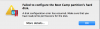
Thank you but no. I suppose I will see the update notification when it is fixed. I really hope this will get fixed eventually because I do like the software very much. Sadly, I can't use it the way I need to at the moment. Luckily I do have a "normal" virtual machine that I can use as a crummy workaround.Hello @JozefL As od now, we do not have any exact ETA for the updates of Parallels Desktop 12. Please subscribe our newsletter for further update.