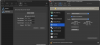
Somehow the shared network isn't really stable. Now it didn't work again, so I've reconfigured it again (shutdown all vm's and parallels before)
I took 192.168.64.0/24 Subnet (while it's not used in any VPN connections or local networks, mac is connected to) and separated it into two subnets:
192.168.64.1/26 for Host-Only Network and 192.168.64.65/26 for Shared Network.
/26 is 255.255.255.192 mask.
Now com.apple.vmnet.plist contains following
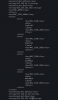
Host_net_address and Shared_net_Address are separated with mask /26.
The network.desktop.xml contains for NetworkID = Shared:
HostIPAddress=192.168.64.65
DhcpIPAddress=192.168.64.65
IPNetMask=255.255.255.192
IPScopeStart=192.168.64.
66
IPScropeEnd=192.168.64.
126
For NetworkID = Host-Only:
HostIPAddress=192.168.64.1
DhcpIPAddress=192.168.64.1
IPNetMask=255.255.255.192
IPScopeStart=192.168.64.
2
IPScropeEnd=192.168.64.
62
It works. So far...