Why does Parallels take up so much disk space?

MathiasN1

Bit poster
Hi!
So I've been wondering lately, why Parallels is taking up so much space.
When I check the space taken in MAC, it takes up almost 70GB of disk space.
When I check every file in my C:\ disk in windows, I only use 32,6 GB. I'm aware that parallels itself take up disk space. But if I recall when first installing Parallels, It wasn't close to 38GB?
What is taking up so much space, I only have one snapshot, and I have reclaimed all the disk space I can?

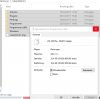
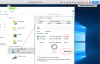
See the two uploaded files.

 

Attachments

  • Skærmbillede 2017-11-07 kl. 12.48.39.png
    Skærmbillede 2017-11-07 kl. 12.48.39.png
    229.8 KB · Views: 101
  • 23336577_10211997232824593_1338664301_o.png
    23336577_10211997232824593_1338664301_o.png
    74 KB · Views: 98
Hello MathiasN1,
Use Finder and locate how many virtual machines (.pvm files) are saved on your Mac then check the size of each virtual machines. If you have multiple virtual machines, move the unused to an external drive or trash.
 
I only have one virtual machine, as showed in the picture uploaded on main thread.
I do not put extra files on Windows, but for each day it keeps increasing the space taken. Today it is 79Gb and yesterday 72Gb, and I have not installed a single file. The virtual machine is optimized, so that it does not take more space than it uses.
 
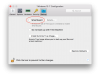
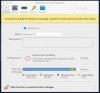
Hi, i'm sure you have made Disk Cleanup in Windows as well as System Cleanup files to remove previous Windows installations. And i pretty sure you have made Reclaim Disk Space... for the VM. What if you have set Smart Guard option in Configuration? Could you please check it for me?Screen Shot 2017-11-17 at 15.27.37.pngScreen Shot 2017-11-17 at 15.32.33.png
 
I'm having same issue and cannot seem to locate windows.old. It's saying that my C drive is eating up almost 60GB and now i can't get windows updates. This just started happening recently
 
I'm having same issue and cannot seem to locate windows.old. It's saying that my C drive is eating up almost 60GB and now i can't get windows updates. This just started happening recently
Hi @JerryP1, seems that your virtual disk needs to be expanded. Do you have enough space available on Mac? Check it via Apple menu > About This Mac > 'Storage' tab. If yes, let's expand the disk.

NOTE: I recommend you making a manual backup of your virtual machine before expanding the disk (http://kb.parallels.com/4859).

To expand the virtual disk please follow this KB: https://kb.parallels.com/en/113972
 
Same here as well...somehow feel this is related to Parallels 13, the VM I installed was literally growing 4GB from 31GB to 35GB...I had to pause it and tried to reclaim some space (from 35GB to 34GB, no much improvement). This was the 2nd time I had this annoying issue: two weeks ago I installed the same VM and backed it up while it was still quite clean and fresh... then it grew to 66GB-70GB but my C:\ is only less than 30GB. So I had to use the fresh backup I mentioned before, and now it seems the same issue comes back... (Windows 10 Education version, Parallels 13, MacBook 2017). It will be great if Parallels team can identify this issue and patch it up. It also seems more severe if I put my Mac into sleep without putting the VM to the sleep mode...saying this is because I literally found the VM size was growing and eating up all the disk space while I 'waked' my Mac...
 
Same here as well...somehow feel this is related to Parallels 13, the VM I installed was literally growing 4GB from 31GB to 35GB...I had to pause it and tried to reclaim some space (from 35GB to 34GB, no much improvement). This was the 2nd time I had this annoying issue: two weeks ago I installed the same VM and backed it up while it was still quite clean and fresh... then it grew to 66GB-70GB but my C:\ is only less than 30GB. So I had to use the fresh backup I mentioned before, and now it seems the same issue comes back... (Windows 10 Education version, Parallels 13, MacBook 2017). It will be great if Parallels team can identify this issue and patch it up. It also seems more severe if I put my Mac into sleep without putting the VM to the sleep mode...saying this is because I literally found the VM size was growing and eating up all the disk space while I 'waked' my Mac...
Hi @Yen-hungL, can you please send us technical report via Help > Send Technical Report. Please post the report ID here.
 
Thank you! You have a snapshot which takes 20Gb of disk space from your Mac. Go to Actions > Manage Snapshots... > delete the snapshot if you no longer need this restore point. Check PVM size then, it should be close to the occupied space reported by Windows but not equal, as PVM file contains several system files apart from Windows data, the biggest one is RAM *.mem file which occupies the same size on disk as RAM size that dedicated to Windows.
 
Report ID 259862442 All I'm trying to do is increase the VM disk space. The configure box is locked tells me to quit Parallels and resume in order to allocate more disk space. When I quit Parallels the box is gone and I'm in a continuous loop. Must be something simple I am missing?????
 
Here's a screen shot telling me to "to be able to change settings on this page resume and then shut it down"
Doesn't make sense??? The configure window disappears.. windows.jpeg
 
I'm having a similar issue with Macbook Air 128GB running Windows 7 Home Premium via Parallels:
attaching Tech Report as requested for other poster above - No doesn't let me due to "invalid extension"
Regards, Rob
PrlProblemReport-2018.06.27-15.18.42.955
PrlProblemReport-2018.06.27-15.18.42.955.tar.gz
 

Attachments

Hello! same problem - PVM file size 104GB occupying way too much space on my 256GB disk to be able to work efficiently. No snapshots. cant even smart backup- its needs 25GB. Just deleted windows.old folder (using system files cleanup under DiskCleanup utility). Thanks in advance./ Regards-Eswar
report ID: 266606032
MBPA1707 with Parallels 13 (official purchase) + Windows 10 Home (official purchase)
 
Hello! same problem - PVM file size 104GB occupying way too much space on my 256GB disk to be able to work efficiently. No snapshots. cant even smart backup- its needs 25GB. Just deleted windows.old folder (using system files cleanup under DiskCleanup utility). Thanks in advance./ Regards-Eswar
report ID: 266606032
MBPA1707 with Parallels 13 (official purchase) + Windows 10 Home (official purchase)
Hello @VigneshE, looks like your Windows 10 occupies a hundred of GBs. Please open your Windows virtual machine and see what files take this space within Windows.
Go to Windows Settings > System > Storage > Free up space now. Additionally, there's a freeware tool called Scanner which will analyze your disk content and help to locate the files you no longer need. Once you free up space within Windows, shutdown Windows virtual machine, open Parallels Desktop Control Center, right-click on the virtual machine > Reclaim Disk Space...
 
Hello @VigneshE, looks like your Windows 10 occupies a hundred of GBs. Please open your Windows virtual machine and see what files take this space within Windows.
Go to Windows Settings > System > Storage > Free up space now. Additionally, there's a freeware tool called Scanner which will analyze your disk content and help to locate the files you no longer need. Once you free up space within Windows, shutdown Windows virtual machine, open Parallels Desktop Control Center, right-click on the virtual machine > Reclaim Disk Space...
Thank you Dmitry@Parallels! The size of my .pvm is miraculously down to 35GB after 1> I uninstall all instances of Onedrive from both the mac and windows and reinstall it with File-on-demand activated. (this is recommended in another post on this forum) 2> delete windows.old folder using system cleanup. Then i follow your instructions. After reclaim disk space> >pvm drops to 30GB. It was all a bit like scatter bombing, but some of it worked. Also I much prefer Disk Inventory X (OSX)/ WinDirStat (windows) over scanner. But thanks for the direction.
To summarise
> I had multiple instances of onedrive installed - I uninstall them all and install in the windows VM. share with Mac.
> My One drive is not File-on-demand enabled. I get it done. Icloud and Google drive do not have this feature as yet.
> I notice my current windows installation is working satisfactorily for sometime now. I consider the pro and con of deleting the windows.old folder. I Back up what I deem necessary. The Best way to delete windows.old is through the system cleanup section of Disk Cleanup.
> I follow up with the storage space freeing commands under both windows and Parallels as mentioned above.
Thanks for the product and the support- Team Parallels!
 
I'm having a similar problem - no snapshots, but somehow parallels is 100GB of hard drive. None is reclaimable. I can't install software on the VM so I can't run Scanner or Disk Inventory X on the VM to see what's being stored. Is there another way (by looking at files on the Mac side, e.g.) to figure this out? If I'm sharing all my mac files with the VM is it somehow duplicating them? It seems to grow even though I'm not doing anything in windows other than checking email, which is staying on a server and not on my machine.

Also, the drive should be an 'expanding disk' with 256GBs available, but it's at 101GB and telling me there is 0 storage available.

So, 1) what's taking 100GB of storage, or how do I figure that out? and 2) why is it out of disk space if it should have access to 256GB?
 
Last edited:
Hi CayleyR, if your VM is only occupying 101GB in 256GB allocated and giving you no space alert means there is no space on the Mac side. Windows can occupy upto 256 GB if there space on Mac. Once you have free space on Mac, launch Windows and check the size of C drive then let us know.
 
Back
Top