
Install the app
How to install the app on iOS
Follow along with the video below to see how to install our site as a web app on your home screen.
Note: This feature may not be available in some browsers.
You are using an out of date browser. It may not display this or other websites correctly.
You should upgrade or use an alternative browser.
You should upgrade or use an alternative browser.
Windows cannot access \\Mac\home\desktop
- Thread starter BillH3
- Start date
Arun@Parallels
Parallels Support
Hi @FELIXW2 , please take a snapshot of your Windows virtual machine (Actions > Take snapshot) , isolate Windows and Mac http://kb.parallels.com/112942 ) and then please uninstall Parallels Tools & Install it once again. Once it is done, please un check isolate Windows and Mac option and check if that helps.
Thanks for the late offer to help. As I wrote already I had finally to do a complete new VM setup and pay next to the Parallels Update of around 70 $ also a full Windows 10 licence of 120 $ as my old Windows 7 Key was not upgradable anymore. Your upgrade policy cost me each time a fortune and lots of useless hours do do so. I am user since Version 6 and very, very disappointed. !!

Hi @FELIXW2, macOS has made vast changes to the landscape of their file systems, security, & system integration. We have to work harder to bring full support to our product for our users! We hope you understand our desire to compensate our brilliant engineers for their hard work.Thanks for the late offer to help. As I wrote already I had finally to do a complete new VM setup and pay next to the Parallels Update of around 70 $ also a full Windows 10 licence of 120 $ as my old Windows 7 Key was not upgradable anymore. Your upgrade policy cost me each time a fortune and lots of useless hours do do so. I am user since Version 6 and very, very disappointed. !!
@PailChris
Yes I understand that and I payed therefore the $ for the Parallels Update V12 to V13. So I expect a smooth and out of the box working after the update. This what I am paying for. And not for hours to reinstall from the scratch Windows and all Programs and pay in addition for a full windows 10 licensed as also Windows does not accept my former windows 7 licence.
I understand that your company is not responsible for Apple and Windows update police. But if your aim is to bridge this worlds with parallels, it is your task to fulfil it properly, especially if you are asking money for the update. May I propose that you develop an easy tool to modify broken drive mapping after the update.?
Yes I understand that and I payed therefore the $ for the Parallels Update V12 to V13. So I expect a smooth and out of the box working after the update. This what I am paying for. And not for hours to reinstall from the scratch Windows and all Programs and pay in addition for a full windows 10 licensed as also Windows does not accept my former windows 7 licence.
I understand that your company is not responsible for Apple and Windows update police. But if your aim is to bridge this worlds with parallels, it is your task to fulfil it properly, especially if you are asking money for the update. May I propose that you develop an easy tool to modify broken drive mapping after the update.?
And just for all others who are stocked with this problem: As you are installing Windows as part of the Parallels environment you get the lastest build Windows 10.1 and your old product key is not valid anymore. So in Germany the Parallels Update is 50 € and Windows 10 Home 145 €. In total you have to spend 195 € equal 230 US $ to have a running system. I did in addition a try with a second hand OEM licence purchase for 40 € who did not work as I would have to install a complete new Windows 10.0 WM again just to try the OEM Key. So over all I spent 277 US $. Would have been a nice Christmas gift for the family instead of hours sitting in-front of the PC fixing problems I would not have.
Tried all this and still does not work. I am very disappointed since upgrading to Ver 13. Everything worked fine until then.Hi @FELIXW2 , please take a snapshot of your Windows virtual machine (Actions > Take snapshot) , isolate Windows and Mac http://kb.parallels.com/112942 ) and then please uninstall Parallels Tools & Install it once again. Once it is done, please un check isolate Windows and Mac option and check if that helps.
Arun@Parallels
Parallels Support
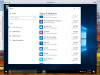
Sent similar problem using report ID three days ago and haven`t heard back from the costumer support since. I think the frustration from some users in this matter is that we can`t find Windows Parallels in the Control Panel as suggested, let alone uninstalling it.
Attachments

alexg
Parallels Developers
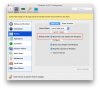
Guys, it seems the problem in Shared Profile feature. To fix the issue please try to do the following:
1. Shutdown Windows
2. Go to VM configuration Options -> Sharing and disable "Share Mac user folder with Windows"
3. Close VM configuration
4. Start Windows
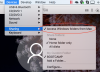
5. After successful boot you need to enable "Share Mac user folder with Windows" option via menu Devices -> Sharing. Windows will prompt you to Log out.
6. Logout and login back
(see pics)
1. Shutdown Windows
2. Go to VM configuration Options -> Sharing and disable "Share Mac user folder with Windows"
3. Close VM configuration
4. Start Windows
5. After successful boot you need to enable "Share Mac user folder with Windows" option via menu Devices -> Sharing. Windows will prompt you to Log out.
6. Logout and login back
(see pics)
Attachments
Guys, it seems the problem in Shared Profile feature. To fix the issue please try to do the following:
1. Shutdown Windows
2. Go to VM configuration Options -> Sharing and disable "Share Mac user folder with Windows"
3. Close VM configuration
4. Start Windows
5. After successful boot you need to enable "Share Mac user folder with Windows" option via menu Devices -> Sharing. Windows will prompt you to Log out.
6. Logout and login back
(see pics)
I did Step 1-4 but don`t understand what did you mean by `successful boot`? Is it meant that after disabling "Share Mac user folder with Windows" one can access \\Mac\home\desktop?
Even though it may work out, I couldn`t enable "Share Mac user folder with Windows" by using Devices->Sharing because the option didn`t appear (see pics)
Attachments
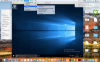
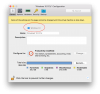
Yes it isAnthonyH5, that is strange. Could you check General tab and confirm you have Windows 10 type OS? See pic.
Attachments
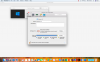
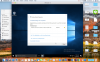
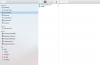
Still not working, however, I noticed that the DVD image file is gone, for some unexplained reason. Possibly this is why the Parallels cannot access Mac file. Do you have any idea to fix this?Ok, just use VM configuration Options -> Sharing and enable "Share Mac user folders with Windows"
Attachments
Thank you very much, now it worksSeems something is wrong with Parallels Tools inside Windows. That is why you do not see Sharing menu in Devices menu. You need reinstall tools using Actions menu then Reinstall/Install Parallels Tools.
