Toolbox is not listed in "Uninstall Program"?Have you tried reinstall them this way?

Install the app
How to install the app on iOS
Follow along with the video below to see how to install our site as a web app on your home screen.
Note: This feature may not be available in some browsers.
You are using an out of date browser. It may not display this or other websites correctly.
You should upgrade or use an alternative browser.
You should upgrade or use an alternative browser.
Windows cannot access \\Mac\home\desktop
- Thread starter BillH3
- Start date
That fixed my problem. I thought it installed toolbox automatically when I pressed the Reinstall button. Opened installer from mount image and then it worked again. Thank you for the help!Have you tried reinstall them this way?
Arun@Parallels
Parallels Support
I tried all of the above for about two hours when I ran into this problem. What finally worked for me was going into File Explorer on Windows 10.1 and fixing the Quick Access information (it was pointing to the \\Mac\home\desktop). Now that it points to the This PC desktop everything is okay.
S
Sathiya@Parallels
Hello KathrynB1. Nice to know that you were able to sort out the issue and thanks for sharing the steps that resolved it. Please post again for any additional queries.I tried all of the above for about two hours when I ran into this problem. What finally worked for me was going into File Explorer on Windows 10.1 and fixing the Quick Access information (it was pointing to the \\Mac\home\desktop). Now that it points to the This PC desktop everything is okay.
I am having this same problem while trying to run Parallels under Apple MacOS Catalina Beta 10.15. I have given Parallels 'full disk access" with no change. I have currently isolated Windows from the Mac under the Control Center and Windows will at least run normally now, with no Mac access, of course. I'm sure this is a Catalina issue and hope the full release will solve this problem. I just wanted Parallels to be aware of this problem. Mac Catalina security is ridiculously high (good thing).
We are aware of the issue. Refer to the article for more details regarding the issues on Catalina.I am having this same problem while trying to run Parallels under Apple MacOS Catalina Beta 10.15. I have given Parallels 'full disk access" with no change. I have currently isolated Windows from the Mac under the Control Center and Windows will at least run normally now, with no Mac access, of course. I'm sure this is a Catalina issue and hope the full release will solve this problem. I just wanted Parallels to be aware of this problem. Mac Catalina security is ridiculously high (good thing).

Maria@Parallels
Problem solver
@BrunoM2, @BertK, please reinstall Parallels Tools and if it will not work, please generate the tech report after the issue reproduced and reply us back with the report's ID.
Looking forward to your reply.
Looking forward to your reply.
@Maria@Parallels I have just uploaded the tech report. I look forward to your thoughts.
I reinstalled and it was fixed. Thank you very much.@BrunoM2, @BertK, please reinstall Parallels Tools and if it will not work, please generate the tech report after the issue reproduced and reply us back with the report's ID.
Looking forward to your reply.
ParallelsU295
Bit poster
I've got the same issue: MacBook Pro running Catalina (Mac OS 10.15 Beta 19A526h) and the latest version of Parallels 15. I've tried all of the workarounds in this thread, and none of them work. I'm glad to know that I'm not the only one with this issue, but it's frustrating all the same.
I submitted a Technical Report, number 320163186
I submitted a Technical Report, number 320163186
I have the same issue ... MacOS 10.15 Beta 5 + Parallels 15 on a MacBook Pro 15, with cannot access \\Mac\Home\Desktop error. I tried reinstalling Parallels Tools, but this did not resolve the issue for me. What I did notice is that the permission issue appears to only be related to folders on the iCloud Drive (eg Desktop, Documents, etc), in that I cannot access them from my Windows guest (Windows 10). Other folders, such as Downloads & Photos, which are "local" are accessible.
Could this be related to some permission issue with iCloud on Catalina?
Could this be related to some permission issue with iCloud on Catalina?
ParallelsU295
Bit poster
It could be; I made sure permissions for both iCloud and my Desktop Folder were clear, and it didn't make any difference. I think it might be the fact that my Desktop folders isn't in my user folder. I count on iCloud for part of my backup plan, so I hate to lose it, but I might shut down iCloud Drive and see what happens.I have the same issue ... MacOS 10.15 Beta 5 + Parallels 15 on a MacBook Pro 15, with cannot access \\Mac\Home\Desktop error. I tried reinstalling Parallels Tools, but this did not resolve the issue for me. What I did notice is that the permission issue appears to only be related to folders on the iCloud Drive (eg Desktop, Documents, etc), in that I cannot access them from my Windows guest (Windows 10). Other folders, such as Downloads & Photos, which are "local" are accessible.
Could this be related to some permission issue with iCloud on Catalina?
ParallelsU295
Bit poster
Well, I deselected my Desktop from the sharing "Configure" panel of the Parallels Sharing pane, and a couple of my Mac icons showed up on my Windows desktop. Looking a File window in Windows, I can see several shared items (see the image below). As you can see, Downloads can be accessed. There are TWO Desktop folders listed, one with a pin icon. That one can't be accessed: I get the same "Windows cannot access \\Mac\Home\Desktop" message. But the lower Desktop folder CAN be accessed, and it is my actual Mac desktop folder.
FWIW, the Pictures, second Desktop, Linda 2019 time sheets, Sermons, and TextEdit folders CAN be accessed, while the first Desktop and iCloud Drive CANNOT be accessed.
I unpinned the TOP Desktop folder, and pinned the LOWER Desktop folder, and reselected Desktop in the Sharing pane, but still get the "Windows cannot access" message.
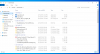
FWIW, the Pictures, second Desktop, Linda 2019 time sheets, Sermons, and TextEdit folders CAN be accessed, while the first Desktop and iCloud Drive CANNOT be accessed.
I unpinned the TOP Desktop folder, and pinned the LOWER Desktop folder, and reselected Desktop in the Sharing pane, but still get the "Windows cannot access" message.
ParallelsU295
Bit poster
And ... turning off iCloud Drive makes my Desktop available in Windows again