Network Initialization Failed

StephenB13

Junior Member
Hi everyone.

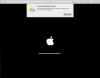
I haven't managed to find any threads with anyone having this same problem. I just downlaoded Parallels Lite to try out running an older version of MacOS to test some things. Whenever I launch a VM I immediately get a message saying: "Network Initialization Failed. Your virtual machine will continue working normally but will have no network connection."

This happens long before the OS loads (or in the case just now after trying again, even before the OS has been installed). I've tried all of the suggested network troubleshooting option but most don't apply (I'm not running windows and the problem seems to be in Parallels not in the OS itself), and none of the others work.

I have selected "shared networking." But I have also noticed that I don't even have the option to choose bridged, and when I look at my network options it doesn't even list any of my network hardware.

I'm at a loss for what to do. I've restarted my Mac, I've uninstalled and reinstalled Parallels. I've installed parallels tools. Again the problem seems to be in parallels itself (or something in my host OS), not in the OS that's being hosted.

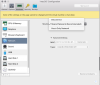
I'v attached a few screenshots of what I'm seeing. Please let me know if you have any questions or need any further information.

I'm running MacOS High Sierra updated to the latest version (though obviously I haven't installed Mojave yet). on my host computer. It's a 2017 5k iMac. 24GB of RAM.

Any suggestions?
 

Attachments

  • Screenshot 2018-10-06 12.05.33.png
    Screenshot 2018-10-06 12.05.33.png
    167.2 KB · Views: 84
  • Screenshot 2018-10-06 12.12.22.png
    Screenshot 2018-10-06 12.12.22.png
    344.6 KB · Views: 78
Network 1 is Ethernet, Network 2 is wireless (which I have turned off). If I set network 1 to "Shared", I get the "Network Initialization failed" error within my Windows VM. If I set it to "Ethernet" I at least get internet within the Windows VM but the network drives and the Mac Home directory are painfully sloooooow to access
 
I had the same problem, when running Shared Network I got no network connection (no message but network status is connected - no internet) and my Mac was running very very slow (also that internet connection got unstable).
I changed the settings in Parallels Desktop - Preferences - Network - Shared - and deactivated IPv6 DHCP.
After that everything worked again like a charm.
Hope it helps you as well.
 
Hi, how to remove virtual machine from root folder? Any command? I used sudo -b /Applications/Parallels\ Desktop.app/Contents/MacOS/prl_client_app and installed a virtual machine but now I want to remove it. I removed it in control center of the app but the space on my mac was not cleared. Thanks.

Hi, I have a 2018 MacBook Pro and a parallel version 16.0.1 (48919). This command works fine for me but when I close the application and terminal then I just restart the application there is the problem again. But if you relaunch the command it works fine. can I resolve it permanently?
 
Hi DaveV2
Thanks for your suggestion - I have done as you suggested and there is now no lag whatsoever with connections to my network and home drives. I still have the nag regarding "Network Initialization Failure" on startup but I can certainly live with that as I can get to the internet within my Windows VM.

Thanks a million :)
 
Hello everyone.
I faced the same problem on my macOS Big Sur and Parallels 16.1.0

I found solution for me:
- go to Parallels Desktop Preferences
- Network tab
- remove all vagrant-vnet* interfaces (I stored only Shared network and Host-only)
- try again `vagrant up`

I guess it will help you.
where is the vagrant up` located ? i dont see anything like that
 
Networking and USB are broken in Parallels Desktop 16.1.1 (49141).
VMWare Fusion 12.1.0 (17195230) works flawlessly.
I'm running Windows 10 in Parallels, which is running on MacOS 11.0.1, on an 8-core MacBook Pro 16" (2019) with 32 GB of RAM, Radeon Pro 5500M 8 GB graphics, and a 1 TB SSD. I'm using the Apple hypervisor.
When I fire up Windows 10, I get two dialog boxes:
"Networking initialization failed," and "Unable to connect 'virtual video camera' to 'Windows 10' now."
None of the proposed solutions work.
What gives, Parallels Customer Support?
 
Networking and USB are broken in Parallels Desktop 16.1.1 (49141).
VMWare Fusion 12.1.0 (17195230) works flawlessly.
I'm running Windows 10 in Parallels, which is running on MacOS 11.0.1, on an 8-core MacBook Pro 16" (2019) with 32 GB of RAM, Radeon Pro 5500M 8 GB graphics, and a 1 TB SSD. I'm using the Apple hypervisor.
When I fire up Windows 10, I get two dialog boxes:
"Networking initialization failed," and "Unable to connect 'virtual video camera' to 'Windows 10' now."
None of the proposed solutions work.
What gives, Parallels Customer Support?
I am having the same issue. And no seems helping. A lot of people having the same issue. I taught the latest update would have solved the issue but parallels teams didn't address that
 
Hello guys, please update your Parallels Desktop version to the latest build and check the issue.
Please share your experiences with us.
No, the latest version 16.1.1, does NOT resolve the Network initialization failed issue. When can we expect a fix? It's hampering a lot of tasks.
I am running Big Sur 11.0.1 on Mac Mini (Late 2014).
 
Hello, I have been able to solve the network problem initialization failed on Big Sur 11.0.1 . Updating to version 16.1.1(49141) these steps.
1) Quit Parallels (shutdown any running VM)
2) Open terminal and type this command
sudo -b /Applications/Parallels\ Desktop.app/Contents/MacOS/prl_client_app
3) then give your user privileges to the app and the .pvm
4) Click on open and select your VM
that's how it worked for me
 
No, the latest version 16.1.1, does NOT resolve the Network initialization failed issue. When can we expect a fix? It's hampering a lot of tasks.
I am running Big Sur 11.0.1 on Mac Mini (Late 2014).
No, the latest version 16.1.1, does NOT resolve the Network initialization failed issue. When can we expect a fix? It's hampering a lot of tasks.
I am running Big Sur 11.0.1 on Mac Mini (Late 2014).
No, the latest version 16.1.1, does NOT resolve the Network initialization failed issue. When can we expect a fix? It's hampering a lot of tasks.
I am running Big Sur 11.0.1 on Mac Mini (Late 2014).
Latest version of parallels desktop pro works fine without any problem. The problem only exists in only in business edition. Just try the pro edition and see it works fine
 
Latest version of parallels desktop pro works fine without any problem. The problem only exists in only in business edition. Just try the pro edition and see it works fine

This is a interesting comment..
Are u sure it ? So I can not imagine that business & pro edition are different..
Is there anyone to do try it ?
 
Back
Top