
Install the app
How to install the app on iOS
Follow along with the video below to see how to install our site as a web app on your home screen.
Note: This feature may not be available in some browsers.
You are using an out of date browser. It may not display this or other websites correctly.
You should upgrade or use an alternative browser.
You should upgrade or use an alternative browser.
Can't activate parallels toolbox.
- Thread starter m.Nak
- Start date

I upgraded a computer and reinstalled Parallels Desktop for Mac on it. Parallels Desktop gave me the option to "Activate This Mac", noting that it would deactivate the previous install, which is what I wanted to do. Parallels Tools, however, won't activate on the new Mac. How do I reset the activation for Parallels Toolbox, as it comes with Parallels Desktop? Is there somewhere in my account where I can deactivate devices on my own?

Maria@Parallels
Problem solver
Hello, could you please reply us back with your Parallels Toolbox license key? (please check your inbox and reply)I upgraded a computer and reinstalled Parallels Desktop for Mac on it. Parallels Desktop gave me the option to "Activate This Mac", noting that it would deactivate the previous install, which is what I wanted to do. Parallels Tools, however, won't activate on the new Mac. How do I reset the activation for Parallels Toolbox, as it comes with Parallels Desktop? Is there somewhere in my account where I can deactivate devices on my own?
Maria@Parallels
Problem solver
Hello,Maria@Parallels, can I get support with activating my license key please? Refer to https://forum.parallels.com/threads...-be-used-to-activate-new-product-copi.351333/.
please reply us back via the private message and provide us with the detailed issue description.
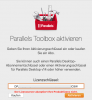
Maria@Parallels Our company subscribed to Parallels Desktop Pro Edition for Mac, I activated Parallels Desktop yesterday with my license key and now tried to use the same credentials for activating the included Parallels Toolbox after downloading and installation. I get an error message, telling me, that ,The license server is not accepting your product key.' I upload the screenshot from my german version. The entered license key is correct, I used the same login credentials as for Parallels Desktop, but it does not work out, tried many times yesterday and today.
Can you please assist?
Can you please assist?
Attachments
Maria@Parallels
Problem solver
Hello, please check the issue (we've made some changes)Maria@Parallels Our company subscribed to Parallels Desktop Pro Edition for Mac, I activated Parallels Desktop yesterday with my license key and now tried to use the same credentials for activating the included Parallels Toolbox after downloading and installation. I get an error message, telling me, that ,The license server is not accepting your product key.' I upload the screenshot from my german version. The entered license key is correct, I used the same login credentials as for Parallels Desktop, but it does not work out, tried many times yesterday and today.
Can you please assist?
Hello, please check the issue (we've made some changes)
Thanks for timely assistance.
I checked again using the correct license code, but it still gives me the same error message as before...
It first takes some time, I see the spinning grey wheel within the dialogue box and than the error message is shown again.
Maria@Parallels
Problem solver
Hi, tried one more thing, please try again.Maria@Parallels Our company subscribed to Parallels Desktop Pro Edition for Mac, I activated Parallels Desktop yesterday with my license key and now tried to use the same credentials for activating the included Parallels Toolbox after downloading and installation. I get an error message, telling me, that ,The license server is not accepting your product key.' I upload the screenshot from my german version. The entered license key is correct, I used the same login credentials as for Parallels Desktop, but it does not work out, tried many times yesterday and today.
Can you please assist?
Hi, tried one more thing, please try again.
Maria@Parallels Thanks a lot for your help, this time it did work out, Toolbox has accepted the license key now! Really appreciate your timely assistance!
Maria@Parallels
Problem solver
Glad to know!Maria@Parallels Thanks a lot for your help, this time it did work out, Toolbox has accepted the license key now! Really appreciate your timely assistance!
Thank you for your reply and please let us know if you have any additional questions.
Maria@Parallels
Problem solver
Hello, we've made some changes with your key.I upgraded a computer and reinstalled Parallels Desktop for Mac on it. Parallels Desktop gave me the option to "Activate This Mac", noting that it would deactivate the previous install, which is what I wanted to do. Parallels Tools, however, won't activate on the new Mac. How do I reset the activation for Parallels Toolbox, as it comes with Parallels Desktop? Is there somewhere in my account where I can deactivate devices on my own?
Please check the issue.
I upgraded to "Parallels Desktop for Mac Pro Edition" subscription with two licenses yesterday.
I could use one activation key on Mac mini successfully, but another one fails on Mac Book Pro.
The message is like "the product license is not accepted on license server." (It's a translation from Japanese)
I need a help.
I could use one activation key on Mac mini successfully, but another one fails on Mac Book Pro.
The message is like "the product license is not accepted on license server." (It's a translation from Japanese)
I need a help.
Maria@Parallels
Problem solver
Hello,I upgraded a computer and reinstalled Parallels Desktop for Mac on it. Parallels Desktop gave me the option to "Activate This Mac", noting that it would deactivate the previous install, which is what I wanted to do. Parallels Tools, however, won't activate on the new Mac. How do I reset the activation for Parallels Toolbox, as it comes with Parallels Desktop? Is there somewhere in my account where I can deactivate devices on my own?
we've reset your license key, please check the issue.
Maria@Parallels
Problem solver
Hello,I upgraded to "Parallels Desktop for Mac Pro Edition" subscription with two licenses yesterday.
I could use one activation key on Mac mini successfully, but another one fails on Mac Book Pro.
The message is like "the product license is not accepted on license server." (It's a translation from Japanese)
I need a help.
please reply us back via the private message with your license key.
I have this exact same issue. I have an active subscription for Parallels Desktop for Mac Pro Edition for two computers - renews on August, 2021. I have two Parallels Desktop for Mac Pro Edition license keys. However, I can only use one of those keys to successfully activate Parallels Toolbox. If I use the second key I get the "The product license is not accepted by the license server" message. If I use the first key on the second computer, it will tell me that license has already been activated on a different computer and asks me if I want to de-activate on the other computer and use it on this computer. That Toolbox activation works if I say 'Yes' but I then have it de-activated on my second computer.
How do I fix this and have Parallels Toobox activated on both computers?
How do I fix this and have Parallels Toobox activated on both computers?
Hi. I have the same issue as other posters. I recently renewed my subscription and have two Parallels Desktop for Mac Pro Edition license keys. The primary key activates both Parallels Desktop and Toolbox on my Mac Mini and the Key#1 activates Parallels Desktop, but not Toolbox, on my Macbook. I get an error saying "The product license is not accepted by the license server". If I try the Primary key instead, it says that the license has already been activated on another computer.
I see that you've been able to help others by resetting their license keys and I'm fine with doing this but is there a general workaround that everyone could follow instead of you having to reset keys for each individual?
Thanks in advance.
I see that you've been able to help others by resetting their license keys and I'm fine with doing this but is there a general workaround that everyone could follow instead of you having to reset keys for each individual?
Thanks in advance.
Maria@Parallels
Problem solver
Hello, could you provide us with both your license keys via the PM please?I have this exact same issue. I have an active subscription for Parallels Desktop for Mac Pro Edition for two computers - renews on August, 2021. I have two Parallels Desktop for Mac Pro Edition license keys. However, I can only use one of those keys to successfully activate Parallels Toolbox. If I use the second key I get the "The product license is not accepted by the license server" message. If I use the first key on the second computer, it will tell me that license has already been activated on a different computer and asks me if I want to de-activate on the other computer and use it on this computer. That Toolbox activation works if I say 'Yes' but I then have it de-activated on my second computer.
How do I fix this and have Parallels Toobox activated on both computers?
Maria@Parallels
Problem solver
Hello, please sorry for the delay in response. Do you still have an issue?I have the same issue with a permanent and up to date PDM v15 license. Does this have to be addressed by support for each individual license?