
Install the app
How to install the app on iOS
Follow along with the video below to see how to install our site as a web app on your home screen.
Note: This feature may not be available in some browsers.
You are using an out of date browser. It may not display this or other websites correctly.
You should upgrade or use an alternative browser.
You should upgrade or use an alternative browser.
High cpu usage due to bsdtar process
- Thread starter CarlB7
- Start date

Maria@Parallels
Problem solver
We didn't meet this issue at the latest Parallels Toolbox version. Could you please collect the tech report once the issue reoccurs and post the report's ID here.Maria... thanks, but the issue with BSDTAR has NOT been fixed with the new rev of the Parallels toolbox or application released. I rebooted by Mac (yes, I have all the latest Catalina, Parallels, Parallels kit versions) and there were 7 bsdtar processes active and ran my computer into the ground... had to manually go into monitor and kill these.
Please fix! for good... Thank you!
Hello, I have the same problem here. 30 bsdtar process using both 100% cpu
Catalina 10.15.4 MacBook Pro 2018.
Parallels Last version 15.
Now I use a open source solution for virtual machine. I'm sorry for that. It was a really nice product that worked well.
But I think There is not solution for this problem I don't have found nothing for repair this problem. Bho I hope one day someone will find an patch
Catalina 10.15.4 MacBook Pro 2018.
Parallels Last version 15.
Now I use a open source solution for virtual machine. I'm sorry for that. It was a really nice product that worked well.
But I think There is not solution for this problem I don't have found nothing for repair this problem. Bho I hope one day someone will find an patch
Once again, after a reboot, 8 bsdtar processes sucking up all the CPU, the cooling fan about to fly away, and the only fix is to manually quit the processes in Activity Monitor. Getting ridiculous that this is still an issue, and who knows how long it will continue to be a problem? It would be nice to see some action on this soon please. Thank you.
tekscrivener
Bit poster
In my case, I believe the cause of the hanging bsdtar processes was improper permissions on the ~/Library directory (no read/execute permission for group or other). I had about 8 of these processes running. I used Activity Monitor to stop them and suddenly my Windows VMs ran at full speed. I've changed the permissions on ~/Library to rwxr-xr-x (with group 'staff'). This is consistent with all the directories underneath. I don't know yet if this will stop future bsdtar processes from hanging, but it might explain why the developers didn't see this bug in Catalina testing. Maybe a fresh install of Catalina gets the ~/Library permissions correct, but an upgrade from Sierra (my case) does not. Or maybe it will still fail because the bsdtar process is unable to read the files it's trying to archive (even though, oddly, it's able to create empty tar.gz files in that directory). This also raises another question. Why is this logging behavior not user-configurable? It seems clear that what's happening is that Toolbox periodically tries to archive the old log files when creating a new one, but I'd like control over how many log files to keep and when/if the log files are archived. All of this is happening invisibly, and it should be a setting in the Toolbox preferences.
Kevin_Jordan
Bit poster
Same issue here. I'm running Desktop version 15, but my toolbox was version 13. I have a permanent license for version 12 too. I uninstalled the toolbox, reinstalled the trial and was greeted with a message that says my product keep doesn't support the latest version and I had to downgrade the product. I tried to do that, which went nowhere. I'm happy to try a 7 day trial to see if the new version of toolbox works but there's no way that suite of miniapps is worth $20/year. I've now wasted an hour on this, but happily the old version is off my machine. if I need a tool, I'll reinstall version 13, use it quickly, and just get rid of it again. Pretty tacky to not have product support for a pervasive issue like this.
I had the same problem. Latest version of OS catalina & Parallels etc. The Parallels toolbox was causing my laptop to overheat constantly (MacBook Pro - 2014). I ended up resolving the bsdtar problem by changing the toolbox settings so that it didn't start up when I switched the laptop on. This completely stopped my laptop from overheating which was a huge relief. It took me about 2 hours to realise that it was the Parallels toolbox that was causing the actual problem in the first place. I had 8-11 bsdtar processes running at over 100% cpu usage. I was getting really worried about my laptop overheating as it was affecting its performance quite badly in everything else which was becoming a serious problem. Now I have no problems at all since I have disabled the toolbox. Clearly this is a serious problem with the toolbox bsdtar process and needs to be fixed before I will ever use the toolbox again.
Maria@Parallels
Problem solver
Hello, please let us know your Parallels Toolbox and macOS versions.I still have this issue. I reported it as well but the only workaround is to quitting bsdtar from activity monitor. This happens every two weeks. Everything is up to date.
Thanks in advance.
macOS Catalina version 10.15.4 (19E287)Hello, please let us know your Parallels Toolbox and macOS versions.
Thanks in advance.
Parallels Toolbox version 2.0.4 (1219)
Maria@Parallels
Problem solver
Parallels Toolbox 2.0 doesn't compatible with the latest macOS.macOS Catalina version 10.15.4 (19E287)
Parallels Toolbox version 2.0.4 (1219)
Could you please update your Parallels Toolbox to the latest build and check the issue?
I have the latest:Parallels Toolbox 2.0 doesn't compatible with the latest macOS.
Could you please update your Parallels Toolbox to the latest build and check the issue?
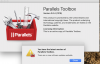
I went into my account and my toolbox expired on 01/2020. I didn't know that. I guess I have buy an upgrade.Parallels Toolbox 2.0 doesn't compatible with the latest macOS.
Could you please update your Parallels Toolbox to the latest build and check the issue?
Aleksandr33
Bit poster
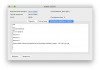
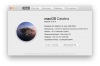
I have the same issue.
See attached screenshots.
See attached screenshots.
Attachments


Maria@Parallels
Problem solver
Hello, Maria. Can the Parallels team make a small release for those customers on a perpetual license of Parallels Toolbox? The last version for use with the perpetual license appears to be 2.0.4 and I rarely use those tools. I'm not asking for all the latest and greatest features and capabilities where I have to pay $20/year. I'm not asking for any change in functionality but for the Parallels team to make a small compatibility fix for macOS Catalina users such as those of us who have posted on this thread. I'm not sure if I speak for everyone on this thread but I certainly am not interested to upgrade to version 3.9. Thank you!
Hello, everyone. I have found a workaround for this problem. It is pretty simple, actually. Follow these steps:
- Quit the Parallels Toolbox app.
- Go to the /Users/_______/Library/Logs folder. (Underlined part of the path is your username).
- Then, scroll down to find the ParallelsToolbox folder.
- Open the ParallelsToolbox folder and delete all the files from it.
- Then, right click on the ParallelsToolbox folder and select Get Info.
- Change the permissions on the folder: set your user to Read Only and set Everyone to No Access.
- Restart the Parallels Toolbox app.
I found a workaround for this issue. Here is the permalink to my solution: https://forum.parallels.com/threads/high-cpu-usage-due-to-bsdtar-process.348187/page-6#post-866143I still have this issue. I reported it as well but the only workaround is to quitting bsdtar from activity monitor. This happens every two weeks. Everything is up to date.
I found a workaround for this issue that involves changing the permissions for a folder in your user Library. I've confirmed this solves the problem on my side. I'm running Parallels Tools 2.0.4 on Catalina and had the same exact problem. Here is the permalink to my solution: https://forum.parallels.com/threads/high-cpu-usage-due-to-bsdtar-process.348187/page-6#post-866143Just upgraded to Mac OS X 10.15 (Catalina) and Parallels Version 15.0.0 (46967) and having a constantly running fan and major battery drain due to Mac process bsdtar. System is a 2016 13" MacBook Pro. What is bsdtar and why does it run long at 100% cpu usage?