Parallels Desktop 9 crashes on Yosemite DP 6

JulioC

Bit poster
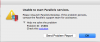
When I try to start Parallels 9.0.24237.1028877 (latest version) under the latest Developer Preview (6, released today), the programs says it can't start and try launching again. It gives me problem ID: 15381. It's not that it completely crashes because clearly it runs kind of okay.

Screen Shot 2014-08-18 at 12.20.52 PM.png
 
With all due respect to Parallels, however, they should have known about the problems their lack of foresight was going to cause on us developers that depend on the OS X beta to do our work.
I, like most of you, cannot wait for a solution from Parallels. So, on that light I decided to run little experiment and installed the VMWare Fusion to get me over the hump.
Thankfully, it worked without a hitch and I was able to import my parallels VM and I am using it without loosing a bit.
I like Parallels and have been a user for a long time, so, I hope they will fix this and other problems, otherwise I will be tempted to jump ship as soon as my VMWare trial ends.
Thank you.

I guess this is why it is called a beta. I seem to recall warnings all over the place saying not to install this on your main machine. I don't think you can blame Parallels for "lack of foresight" over a third-party software (Yosemite) which is still in development.

Perhaps you should wait for the consumer release, in the Autumn.
 
Anyone know how to download the version 9.0.24237? I need Parallels running ASAP. Thank you.

That's the version you can download directly from Parallels. But if you have DP6, you'll run into the problem described in this thread. doldis77 above seemed to have better luck with Build 9.0.24229. One page back, somebody from Parallels said that they are working on a solution to this problem.
 
Since I installed Yosemite Beta 6 yesterday, parallels doesn't start-up anymore. Error reading like "parallel services can't start" popping up. Anyone else facing this? Any solutions or work arounds? With Beta 5 everything worked well.
 
"sudo /Applications/Parallels\ Desktop.app/Contents/MacOS/Parallels\ Service.app/Contents/MacOS/prl_disp_service -e" and then starting Parallels works for me!

It would be helpful that personnel who have managed to get it running using the prl_disp_service command write down their system details. At a minimum, pleas provide:
- Parallels Version
- OS X version (I assume this is OS X 10.10 DP6 for everyone in this thread)
- Hardware platform
- User account in OSX (Admin or User)

This might help in further ironing out why it is not working for some people...
 
Guru,

- Parallels Version: ParallelsDesktop-9.0.24237.1028877
- OS X version: OS X 10.10 DP6
- Hardware platform: Macbook Pro 15 Retina 2.3 I7, 16GB RAM
- User account in OS X: Admin
 
Guru,

- Parallels Version: ParallelsDesktop-9.0.24237.1028877
- OS X version: OS X 10.10 DP6
- Hardware platform: Macbook Pro 15 Retina 2.3 I7, 16GB RAM
- User account in OS X: Admin

Sorry, forgot to add.. should also write whether fix working or not. I presume in your case, it has not worked.
 
The terminal solution worked for me with same system specs as RodrigoO:
- OS X version: OS X 10.10 DP6
- Hardware platform: Macbook Pro 15 Retina 2.3 I7, 16GB RAM
- User account in OS X: Admin

Parallels:
- Parallels Version: ParallelsDesktop-9.0.24229 Rev 991745
 
Last edited:
Back
Top