I didn't check the exact version of 16 when I used it as trial version, and now the trial is over and I've returned to Version 13. Can I get one more trial with the version 16.1.0?Hello, did you test it with the latest Parallels Desktop build 16.1.0? Did you get the same behavior?

Install the app
How to install the app on iOS
Follow along with the video below to see how to install our site as a web app on your home screen.
Note: This feature may not be available in some browsers.
You are using an out of date browser. It may not display this or other websites correctly.
You should upgrade or use an alternative browser.
You should upgrade or use an alternative browser.
Still over 100% CPU Usage . . . HELP
- Thread starter JohnH36
- Start date
-
- Tags
- performance
This is super frustrating. Does not happen every time but far too often. Still happens after a full restart of Windows 10 and Parallels. Sometimes it calms down after letting it consume my machine for 5 minutes. It kinds of defeats the purpose of quick resume from suspension.
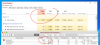
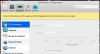


Hi, I have same problem with my MacBook Pro 13 2019. CPU usage over 100%, fans at max. Big Sur installed and Parallels 16.1.1, running Windows 10 from Boot Camp. After doing nothing for 10 minutes CPU goes to 50% but then if I open Start menu on Windows CPU goes up to 200%, fans start spinning crazy and temp is going up. Not possible to work, I cannot concentrate with those fans at max 
Is there any indication where the problem might be and that you are working on it?
Is there any indication where the problem might be and that you are working on it?

Maria@Parallels
Problem solver
Hello, did you try any steps from this KB article?Hi, I have same problem with my MacBook Pro 13 2019. CPU usage over 100%, fans at max. Big Sur installed and Parallels 16.1.1, running Windows 10 from Boot Camp. After doing nothing for 10 minutes CPU goes to 50% but then if I open Start menu on Windows CPU goes up to 200%, fans start spinning crazy and temp is going up. Not possible to work, I cannot concentrate with those fans at max
Is there any indication where the problem might be and that you are working on it?
Yes I am, but no helpHello, did you try any steps from this KB article?
TerrenceS1
Bit poster
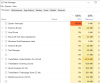
I am having a similar problem. System goes to 100% at times and my app hangs. What I see is if I go and start Task Manager From the Parallels bar is that System interrupts is running at 100%. After starting task manager the system free up and runs better until it happens again. I get this error whether or not I have my application in Windows running. Help from support has been marginal. The next thing they want me to do is rebuild my Windows virtual machine. I will do that but doubt that will fix the problem. My understanding is from a Windows standpoint is System interrupts is used to interface to the hardware. Since Parallels is providing Windows access to the hardware I would think that is where the problem is.
Maria@Parallels
Problem solver
Hi, did you perform any steps from this KB article?same issues as everyone else. Still no support?
Maria@Parallels
Problem solver
Hi, could you please add 2 CPU and 3-4GB memory and check the issue?I am having same performance issues. I have parallels version 16 (the latest). Generated a technical report and sent to Parallels - 356573594
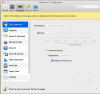
I found out its related to graphics settings for my set up - if I use scaled option (and thats what I would like to use as any other option for my vm win7 is useless) my CPU load is very very high (around 100% until machine is paused). If I go for any retina settings its around 20%.
Macbook pro 16" 64GB RAM 8core i9 4TB SSD.
Virtual machine win7, 2 processors, 8GB RAM, 256GB hdd with more than 50% empty, high perf.graphics off, Hypervisor - parllels, graphics memory 512MB
Macbook pro 16" 64GB RAM 8core i9 4TB SSD.
Virtual machine win7, 2 processors, 8GB RAM, 256GB hdd with more than 50% empty, high perf.graphics off, Hypervisor - parllels, graphics memory 512MB
Attachments
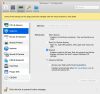
Yeah, did nothing.Hi, did you perform any steps from this KB article?
I have a similar issue. VM process on macOS using 200%, Windows way less...
Tech report ID: 359861531
Very frustrating. After a long wait for Apple hypervisor issues to be fixed, now this... the app is barely usable.
Tech report ID: 359861531
Very frustrating. After a long wait for Apple hypervisor issues to be fixed, now this... the app is barely usable.
Attachments
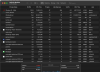
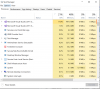
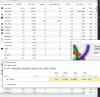
ok, according tins article:
"The maximum utilization of every CPU unit assigned to a virtual machine in Activity Monitor counts as 100%. For example, if your virtual machine has 4 CPU units assigned, then a total amount of CPU utilization by a VM will be 400%."
so, a value of cpu usage by parallel desktop process is normal to be over 100%.
Our problem, I supose, is hight temperaure of CPU and noise of fan.
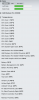
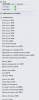
I make several tests an I conclude that fan becoming crasy over 70 Celsius în CPU and this is happen only when I use the second monitor, bay be becouse of graphics processor temp.
For me, this topic is solved.
First image: with normal activity and second monitor: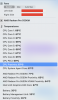
Second image, no activity and second monitor:
thirth image: with activity and without second monitor:
"The maximum utilization of every CPU unit assigned to a virtual machine in Activity Monitor counts as 100%. For example, if your virtual machine has 4 CPU units assigned, then a total amount of CPU utilization by a VM will be 400%."
so, a value of cpu usage by parallel desktop process is normal to be over 100%.
Our problem, I supose, is hight temperaure of CPU and noise of fan.
I make several tests an I conclude that fan becoming crasy over 70 Celsius în CPU and this is happen only when I use the second monitor, bay be becouse of graphics processor temp.
For me, this topic is solved.
First image: with normal activity and second monitor:
Second image, no activity and second monitor:
thirth image: with activity and without second monitor:
I started hitting this same thing after I enabled Nested Virtualization on the Windows10 vm. I use a bootcamp vm and wanted to use the linux subsystem. The difference between nested virtualization on and off is extreme. with it on, i'm running 200-800 %cpu according to Activity Monitor even when Task Manager is showing 5%. With it off, everything drops down to < 100%. right now cruising at 50% on the activity monitor.