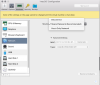
Network Initialization Failed

StephenB13

Junior Member
Hi everyone.

I haven't managed to find any threads with anyone having this same problem. I just downlaoded Parallels Lite to try out running an older version of MacOS to test some things. Whenever I launch a VM I immediately get a message saying: "Network Initialization Failed. Your virtual machine will continue working normally but will have no network connection."

This happens long before the OS loads (or in the case just now after trying again, even before the OS has been installed). I've tried all of the suggested network troubleshooting option but most don't apply (I'm not running windows and the problem seems to be in Parallels not in the OS itself), and none of the others work.

I have selected "shared networking." But I have also noticed that I don't even have the option to choose bridged, and when I look at my network options it doesn't even list any of my network hardware.

I'm at a loss for what to do. I've restarted my Mac, I've uninstalled and reinstalled Parallels. I've installed parallels tools. Again the problem seems to be in parallels itself (or something in my host OS), not in the OS that's being hosted.

I'v attached a few screenshots of what I'm seeing. Please let me know if you have any questions or need any further information.

I'm running MacOS High Sierra updated to the latest version (though obviously I haven't installed Mojave yet). on my host computer. It's a 2017 5k iMac. 24GB of RAM.

Any suggestions?

 

Attachments

  • Screenshot 2018-10-06 12.05.33.png
    Screenshot 2018-10-06 12.05.33.png
    167.2 KB · Views: 84
  • Screenshot 2018-10-06 12.12.22.png
    Screenshot 2018-10-06 12.12.22.png
    344.6 KB · Views: 78
Why is the support so silent on this? The business edition doesn't deserve the attention ?
I tried everything, and running with sudo is just ridiculous since the workflow is broken, fix it already, give a proper communication on social
 
For Big sur user's The only solution for now is to use the parallel version 15 & When you want to run the Parallel use this 2 command lines and run it on terminal
Run terminal :
first run this line : export SYSTEM_VERSION_COMPAT=1
Second Run this line :
open -a "Parallels Desktop"
this is the only solution until parallel team cover the network problem in the new version
 
Hello Support. I just upgraded to Big Sur 11.0.1, and am running Parallels 16.1.1. I'm having the same network problems as everyone else. I have a bridged/bonded network connection on my Mac (802.3ad/LACP), named "bond0" by macOS. It was working fine in Catalina. In Big Sur, "bond0" is MISSING from the Bridged Network drop-down list. Being a bond, individual network adapters will not work. I've tried both terminal commands being circulated in these forums, but nothing is working. I have many NAS shares, so cannot be using bridged mode. Any insight from the development team? Thanks.
 
Hello Support. I just upgraded to Big Sur 11.0.1, and am running Parallels 16.1.1. I'm having the same network problems as everyone else. I have a bridged/bonded network connection on my Mac (802.3ad/LACP), named "bond0" by macOS. It was working fine in Catalina. In Big Sur, "bond0" is MISSING from the Bridged Network drop-down list. Being a bond, individual network adapters will not work. I've tried both terminal commands being circulated in these forums, but nothing is working. I have many NAS shares, so cannot be using bridged mode. Any insight from the development team? Thanks.


For Big sur user's The only solution for now is to use the parallel version 15 & When you want to run the Parallel use this 2 command lines and run it on terminal
Run terminal :
first run this line : export SYSTEM_VERSION_COMPAT=1
Second Run this line :
open -a "Parallels Desktop"
this is the only solution until parallel team cover the network problem in the new version
 
For Big sur user's The only solution for now is to use the parallel version 15 & When you want to run the Parallel use this 2 command lines and run it on terminal
Run terminal :
first run this line : export SYSTEM_VERSION_COMPAT=1
Second Run this line :
open -a "Parallels Desktop"
this is the only solution until parallel team cover the network problem in the new version
Do we have to do this each time, or once is enough?
 
It looks like the error cause is a non-existent network interface (in my case, en6). When launching the VM, app tries to create a bridged interface, but fails if we're not the root (it also fails with sudo -u).
Workaround: sudo -bEH /Applications/Parallels\ Desktop.app/Contents/MacOS/prl_client_app
 
Hi all,

So it does seem that running this command in terminal will get networking working with Parallels 16.1.1.

sudo -b /Applications/Parallels\ Desktop.app/Contents/MacOS/prl_client_app
However, it seems if you launch Parallels this way, Coherence now no longer works.
If I launch parallels without the above command (regular way you would launch), it will load with the network error message, but then Coherence works. So it seems that although that workaround fixes the network issue, it breaks Coherence.

What's the deal?!?
 
Hi all,

So it does seem that running this command in terminal will get networking working with Parallels 16.1.1.

sudo -b /Applications/Parallels\ Desktop.app/Contents/MacOS/prl_client_app
However, it seems if you launch Parallels this way, Coherence now no longer works.
If I launch parallels without the above command (regular way you would launch), it will load with the network error message, but then Coherence works. So it seems that although that workaround fixes the network issue, it breaks Coherence.

What's the deal?!?
When launching with sudo Parallels won't be in the same session as you (the regular user) are - it basically switches the user, so as long as you're not logged in to a graphical session Coherence (and a lot of similar stuff) won't probably work.
 
When launching with sudo Parallels won't be in the same session as you (the regular user) are - it basically switches the user, so as long as you're not logged in to a graphical session Coherence (and a lot of similar stuff) won't probably work.

Thanks for the reply and explanation. So given that there is no fix provided by parallels (which is absolutely pathetic at this stage), what option do I have to use with network and coherence. Is there a way I can launch the application or get both network and coherence to work? Thanks in advance!
 
I see that people with geniue Parallels licenses does not have any issue at all about network configuration. My clients are asking me sometimes about it and i found out they have pirated versions of Parallels. I told them to buy license from Parallels. And when they buy license directly from Parallels, issue is fixed.
 
Back
Top